
If you’re building or upgrading an AM5 system and want a motherboard that leaves nothing on the table, the GIGABYTE X870E AORUS Master X3D deserves a hard look. Built around AMD’s X870E chipset, this board pairs a beefy power delivery system with cutting-edge connectivity like USB4 and Wi-Fi 7.
It’s clearly aimed at enthusiasts who want peak performance from Ryzen 9000, 8000, and 7000 series CPUs. No real corners cut here.
With five M.2 slots, dual PCIe 5.0 x16 slots, and a 22-phase VRM, the AORUS Master X3D is one of the most feature-dense AM5 motherboards you can buy right now. It supports up to 256 GB of DDR5 memory across four DIMM slots.
You also get a five-year manufacturer warranty, which is pretty reassuring.

- AMD Socket AM5: Ready to support Ryzen 9000 /8000/7000 Series Processors.
- Enhanced Power Solution: Digital Twin 18+2+2 Power Phase with 8-layer PCB and premium chokes and capacitors for steady power delivery.
- Advanced Thermal Armor: Advanced VRM heatsinks for better heat dissipation. Integrated I/O Shield for quicker PC DIY assembly.

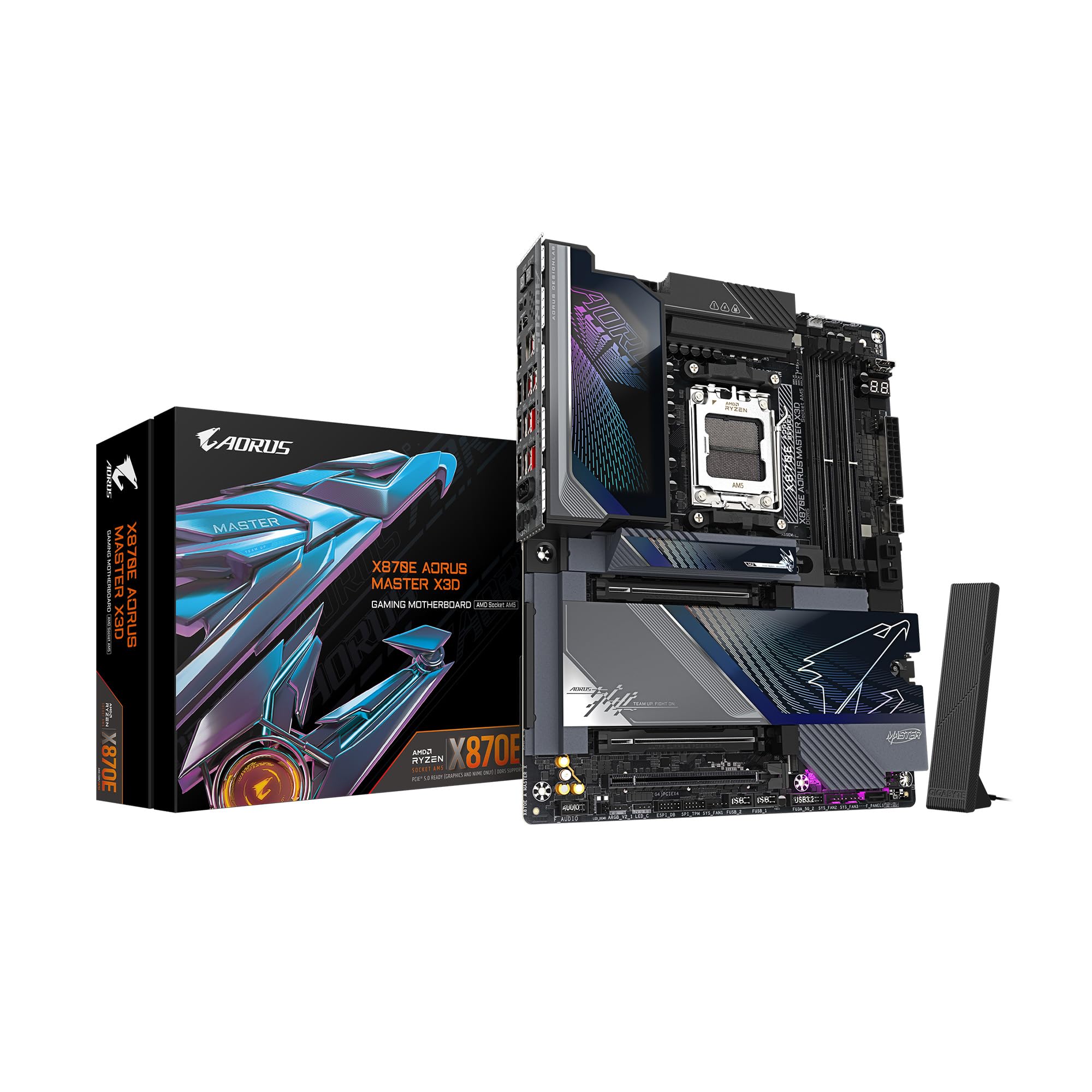
The board includes a Sensor Panel Link via its onboard HDMI output. That means you can hook up a small in-chassis display without needing a dedicated GPU output.
It’s a nice touch for custom builders who care about both aesthetics and monitoring. Not everyone needs that, but if you do, it’s just… handy.
Whether you’re gaming on a Ryzen 7 9800X3D or running heavy multithreaded workloads, this board has the platform headroom to keep up as AMD keeps evolving the AM5 socket. It feels like a board that wants to stick around for a while.
Bottom Line
The AORUS Master X3D is a compelling pick if you want the best AM5 motherboard for future-proofed expansion and top-tier power delivery. It isn’t cheap, but the feature set justifies the investment for serious builders.
Click here to check the latest price on the GIGABYTE X870E AORUS Master X3D on Amazon!
Overview Of The GIGABYTE X870E AORUS Master X3D
At its core, this ATX motherboard runs AMD’s X870E chipset, which sits above the standard X870. It supports the full lineup of AM5 Ryzen processors.
It ships ready for DDR5 at a base clock speed of 5200 MHz, with AMD EXPO support for easy memory overclocking. That’s a welcome feature for folks who don’t want to fuss too much with the details.
| Specification | Detail |
|---|---|
| Chipset | AMD X870E |
| Socket | AM5 |
| Form Factor | ATX |
| Power Phases | 18+2+2 |
| PCB Layers | 8 |
| Memory | 4x DDR5 DIMM, up to 256 GB |
| PCIe 5.0 x16 Slots | 2 |
| M.2 Slots | 5 (2x PCIe 5.0, 3x PCIe 4.0) |
| USB4 Ports | 2 (Type-C with DP-Alt) |
| Networking | Wi-Fi 7, Dual Ethernet |
| Warranty | 5 Years |
The “X3D” in the name reflects GIGABYTE’s M.2 expansion approach. Five NVMe slots in the layout is a generous move for builders who want fast local storage for creative or data-heavy workflows.
AM5 Upgrade Value
Socket AM5 is a long-term play. AMD’s committed to supporting the platform through multiple processor generations, so the board you buy today could last you through several CPU upgrades.
Compatibility covers Ryzen 7000, 8000, and 9000 series chips. Start with a mid-range Ryzen 7, then bump to a flagship Ryzen 9 later—the Master X3D’s VRM and thermal design should handle it.
DDR5 memory support puts you in a good spot as prices drop and speeds rise. Four DIMM slots mean you can start with 32 GB and scale up to 256 GB as your needs grow.
For anyone planning to stick with AM5 for a few years, investing in a premium X870E board now means you’re less likely to need a motherboard swap later.
18+2+2 Power Design
Stable power delivery is what separates enthusiast motherboards from budget ones, and GIGABYTE doesn’t skimp here. The 18+2+2 digital twin power phase design spreads current across 22 total phases, which helps with heat and electrical stress.
An eight-layer PCB provides cleaner signal paths and better thermal conductivity than the four- or six-layer designs you see on cheaper boards. GIGABYTE uses premium chokes and capacitors too.
In practice? You get more stable voltages under heavy all-core loads and better overclocking headroom. If you’re pushing a high-TDP Ryzen 9 or tweaking voltages, the VRM isn’t going to be your bottleneck.
The 24-pin main power connector is standard ATX. With the supplemental CPU power connectors, the board draws clean, consistent power even during stress tests.
PCIe 5.0 And M.2 Expansion
Two reinforced PCIe 5.0 x16 slots are at the heart of the expansion layout. GIGABYTE’s UD Armor helps protect these slots from GPU sag and physical damage during installation.
Storage is where the Master X3D really shows off. Five M.2 slots:
- 2x PCIe 5.0 M.2 for the fastest available NVMe drives
- 3x PCIe 4.0 M.2 for high-speed secondary storage
This setup lets you run a Gen 5 boot drive alongside multiple Gen 4 storage drives without add-in cards. Content creators, game developers, and data professionals will get the most out of this NVMe density.
There are two SATA ports, but the focus is clearly on M.2. If you need lots of SATA, keep that in mind.
USB4, WiFi 7, And High-Speed Connectivity
Rear I/O is stacked. Two USB4 Type-C ports with DisplayPort Alt Mode let you run external displays or connect Thunderbolt-compatible gear at up to 40 Gbps.
Other USB ports include:
- 1x USB 3.2 Gen 2×2 Type-C (20 Gbps)
- 1x USB 3.2 Gen 2 Type-C
- 7x USB 3.2 Gen 2 Type-A
- 65W front panel USB-C for charging devices through your case
That’s 11 USB ports on the rear alone. Wi-Fi 7 brings the latest in wireless networking.
Dual Ethernet ports offer wired redundancy or link aggregation for those who want it. The Sensor Panel Link (HDMI output) is a quirky but cool feature—it lets you route video to a small LCD inside your case for temps, clocks, or custom graphics, without tying up a GPU output.
Cooling And Build-Friendly Design
Big VRM heatsinks sit directly over the power phases, using more surface area and direct contact to pull heat away during long loads. This passive cooling keeps the VRM zone quiet and safe.
An integrated I/O shield means no more fiddling with a separate metal plate. Just drop the board in—one less thing to worry about.
ATX dimensions (about 12 x 9.6 inches) fit standard cases easily. There’s decent spacing around the CPU socket and memory slots for large tower coolers or AIO radiator mounts.
Thermal pads cover the M.2 slots, helping NVMe drives keep their speeds up under heavy use.
Pros
Strong Platform Headroom
The 18+2+2 VRM design and eight-layer PCB give you considerable overclocking headroom and multi-generational CPU support. You can confidently run current Ryzen processors at full power and upgrade to future AM5 chips as they release.
The 256 GB DDR5 ceiling and EXPO support mean your memory config can scale with your processor choices.
Excellent Expansion Options
Five M.2 slots (two Gen 5, three Gen 4) and dual PCIe 5.0 x16 slots provide exceptional storage and GPU bandwidth. USB4, Wi-Fi 7, dual LAN, and 11 rear USB ports cover pretty much every connectivity scenario.
Not many AM5 boards match this level of expansion without add-in cards.
Cons
Setup And Documentation Friction
Some users say initial BIOS setup and memory tuning take patience. Documentation could be better, especially for EXPO profiles and optimal settings for specific CPUs and memory.
First-time builders might face a steeper learning curve than they’d like.
Not Ideal For SATA-Heavy Builds
Only two SATA ports here—the focus is all about M.2 NVMe storage. If you rely on a bunch of SATA hard drives or SSDs, you’ll need an add-in card or a different board.
It’s an intentional trade-off, but worth flagging if you’ve got legacy drives.
Customer Reviews
Early adopter feedback on the AORUS Master X3D is mixed but leans positive. Users praise the board’s build quality, VRM performance, and the sheer number of M.2 slots.
USB4 and Wi-Fi 7 connectivity also get good marks from folks who actually use high-speed peripherals and wireless networking. On the flip side, a few buyers mention frustrations with BIOS settings and initial memory compatibility.
Some ran into a learning curve configuring EXPO profiles, especially with faster DDR5 kits. There are also comments that documentation could be more detailed, considering the price point.
The five-year warranty from GIGABYTE is a nice reassurance for a premium purchase. The board is currently among the top sellers in its category on Amazon, so there’s definitely strong market interest—even with those mixed early ratings.
Frequently Asked Questions
How does the board perform with Ryzen X3D CPUs in gaming and productivity workloads?
The Master X3D pairs well with Ryzen X3D processors like the 9800X3D, providing clean and stable power delivery that lets the CPU’s 3D V-Cache shine in gaming. Productivity workloads also benefit from the board’s robust VRM, which maintains consistent clocks during heavy all-core rendering and compilation tasks.
DDR5 EXPO support ensures memory runs at optimal speeds for both use cases.
What are the key differences between the Master X3D and the Elite X3D in features and value?
The Master X3D steps up from the Elite with a more robust 18+2+2 power phase design, an eight-layer PCB, and dual USB4 Type-C ports. It also includes more M.2 slots and premium VRM heatsinks.
If you plan to overclock or run high-TDP processors long-term, the Master’s enhanced power delivery and connectivity justify the price premium over the Elite.
How strong is the VRM and thermal design under sustained loads and overclocking?
The 22-phase digital twin VRM uses premium chokes and capacitors to handle sustained all-core loads without thermal throttling. Advanced heatsinks over the VRM zone dissipate heat pretty well through passive cooling.
Even if you push manual overclocks and crank up voltages, VRM temps tend to stay within safe limits. That eight-layer PCB really helps with thermal conductivity.
What PCIe 5.0 and storage configuration options are available, and are there any lane-sharing limitations?
You get two PCIe 5.0 x16 slots for graphics cards, plus two PCIe 5.0 M.2 slots and three PCIe 4.0 M.2 slots. Not bad, honestly.
Like most X870E boards, some lane sharing can crop up between M.2 and PCIe slots if you fill everything at once. It’s worth checking GIGABYTE’s lane allocation chart in the manual—nobody wants surprise bandwidth issues.
What are the networking and connectivity features (Wi‑Fi, LAN, USB4/USB‑C), and how well do they work in practice?
Wi-Fi 7 offers the fastest wireless speeds out there and noticeably lower latency than Wi-Fi 6E. Dual Ethernet ports give you some extra wired flexibility.
The two USB4 Type-C ports handle 40 Gbps transfers and DisplayPort output, and they seem to work reliably with docks and displays. For peripherals, the 65W front USB-C and 11 rear USB ports are more than enough—maybe even overkill, but hey, better too many than too few.
Where can I find the manual, BIOS update process, and recommended settings for stable memory (EXPO) tuning?
GIGABYTE keeps the manual, BIOS files, and drivers on their official support page for the X870E AORUS Master X3D. You can snag everything you need there, honestly—it’s more convenient than digging through random forums.
BIOS updates? Those are handled through the Q-Flash utility, and you don’t even need to have a CPU installed for that part. That’s pretty handy, right?
For stable EXPO tuning, just load your memory kit’s default EXPO profile in the BIOS first. Run a memory stress test to make sure things are solid before getting fancy and tweaking timings by hand.


