
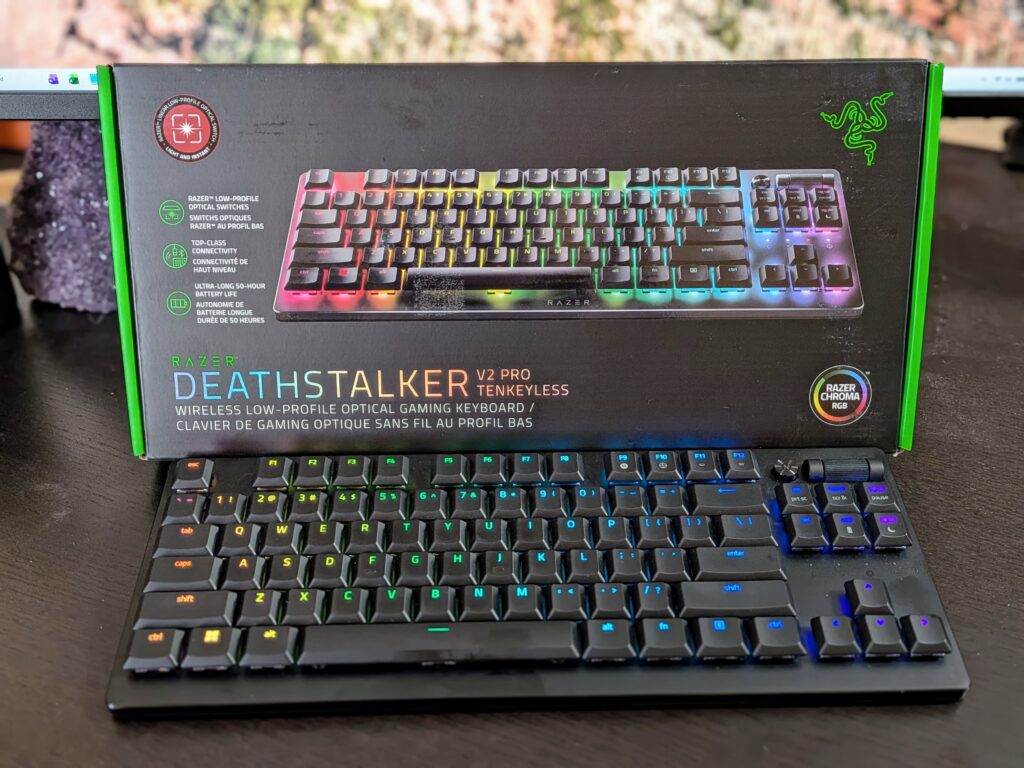
Looking for a compact wireless board that doesn’t just feel like a laptop keyboard stuck to your desk? The Razer DeathStalker V2 Pro TKL is Razer’s take for folks who want low-profile keys, an aluminum build, and no cable snaking to the PC.
This thing pairs low-profile linear optical switches with HyperSpeed Wireless (Razer’s 2.4GHz dongle), Bluetooth 5.0 for up to three devices, and a battery that can stretch to about 200 hours—if you’re cool with the lighting off.
If you want gaming keyboard speed without the usual height, heft, or numpad, this is one of the rare options that actually nails all three.

- LOW-PROFILE LINEAR OPTICAL SWITCHES — Perform quicker keystrokes with all-new switches that have a shorter actuation height for reduced key travel, backed by a 70-million keystroke lifespan for long-lasting performance
- TOP-CLASS CONNECTIVITY — Experience lag-free gaming and instant response with Razer HyperSpeed Wireless (2.4GHz) connection or unlock greater functionality with Bluetooth 5.0 and toggle between 3 devices
- ULTRA-LONG UP TO 200-HOUR BATTERY LIFE — Power through an entire day of gaming without breaking a sweat, also includes a detachable Type-C cable for continued use while charging

There are trade-offs. It’s a premium buy, the TKL layout takes some getting used to if you’re coming from a full-size board, and a few owners do run into the occasional 2.4GHz hiccup.
Whether that’s a dealbreaker? That really depends on your desk setup and what you play.
Bottom Line
For hybrid work-and-play setups where desk space is at a premium and cables are just annoying, the DeathStalker V2 Pro TKL pulls its weight with speedy keys, long battery life, and a build that feels a lot sturdier than you’d expect from something this thin.
Check current availability and pricing for the Razer DeathStalker V2 Pro TKL here.
Razer DeathStalker V2 Pro TKL Overview
Chop the numpad off Razer’s slim flagship and you get a board around 14.07 by 5.48 inches, just a hair over an inch tall. At 1.6 pounds, it’s heavy enough to stay put during frantic mouse flicks, but you can still toss it in a backpack.
The 87-key layout uses laser-etched keycaps with a HyperGuard coating to fight off shine and legend wear. Per-key Chroma RGB, a multi-function roller, and a dedicated media button fill out the top-right corner.
Everything runs through Razer Synapse 4 on Windows. That’s where you handle lighting, remapping, and Snap Tap.
This is the second-gen design. The main changes? You’ll notice it most in the switch feel and stability, not in any wild new features.
Low-Profile Linear Optical Switches
Typing here feels a lot like a really good scissor-switch laptop—just snappier. The linear travel is short, the actuation sits high, and there’s no tactile bump slowing you down when you’re hammering movement keys.
Optical actuation means the keys register with light instead of metal contacts, so debounce delay drops and the rated lifespan climbs to 70 million presses per key.
The sound is actually a nice surprise. These are quiet for mechanical switches, more of a soft click than a clack, which is a lifesaver on shared desks or calls.
Stability is solid, too. Not much keycap rattle, even on the spacebar and shift.
HyperSpeed Wireless And Bluetooth Flexibility
You get two radios, three Bluetooth slots, and a USB-A dongle—should cover most setups. HyperSpeed handles gaming with latency low enough you probably won’t notice a difference from wired, and Bluetooth 5.0 lets you bounce between laptop, tablet, and desktop without fuss.
Switching devices is done with a keyboard shortcut, not a physical switch. It takes a couple sessions to get used to.
Just a heads up: a minority of owners report some 2.4GHz dropouts, sometimes mid-game. Usually, plugging the dongle into a front-panel or extension port instead of a crowded rear USB hub fixes it, but it’s still a frustration for a few.
Battery Life And USB-C Charging
The 200-hour claim is with lighting off—just being real. If you crank the Chroma to full, you’ll be charging every few days. Kill the RGB, and you can honestly go weeks between plugging in.
Plenty of users end up disabling backlighting for daily use and only turn it on when they want the desk to look good.
Charging is via detachable USB-C, and the board works fine while plugged in, so a dead battery won’t ruin your night. That cable is also handy for travel—no need to hunt for a weird proprietary connector.
Slim Aluminum Build And Media Controls
Pick it up and you’ll notice the aluminum top plate right away. There’s a density here that plastic boards just can’t match, and the low profile keeps your wrists closer to neutral, which is actually a real ergonomic plus if you type for hours.
The multi-function roller sits with a media button in the top-right. Out of the box it’s for volume, but you can reassign it to brightness, scrolling, or whatever through Synapse. Flicking it with your finger while gaming is easy, no need to look down.
If you’re new to compact boards: keys are close together, and hitting Caps Lock instead of Shift is a common rookie mistake for the first week or so.
Pros And Cons
| Category | Summary |
|---|---|
| Best for | Compact desks, hybrid work-and-game setups, multi-device users |
| Weakest point | Occasional 2.4GHz dropouts reported by some owners |
| Learning curve | Moderate if coming from a full-size or standard-height board |
Pros
- Low-profile linear optical switches feel fast and stay quiet
- Minimal keycap rattle and solid stability compared to rival slim boards
- Aluminum top plate gives real heft without added thickness
- Up to 200-hour battery with lighting off, plus usable while charging
- HyperSpeed 2.4GHz for gaming and Bluetooth 5.0 for three devices
- Detachable USB-C cable makes travel simple
- Snap Tap available through Synapse 4 for movement-key prioritization
Cons
- Premium pricing puts it above most slim wireless competitors
- Some users report intermittent wireless dropouts on the 2.4GHz connection
- Tight key spacing leads to Caps Lock and Shift mix-ups early on
- Full RGB brightness drastically shortens battery life
- Isolated reports of battery charging failure after roughly a month
- Synapse software required for remapping and Snap Tap, Windows only
Customer Reviews
Feedback is mostly positive. The recurring praise? Stable keycaps without the annoying rattle you get on some other low-profile boards, quiet keys that stay responsive, and battery life that’s actually decent if you leave the RGB off.
Plenty of folks moving from full-size mechanical boards mention all the desk space they got back. Portability comes up a lot, too, plus easy pairing and the fact you can keep working while charging.
There’s criticism, sure. The biggest complaint is the 2.4GHz connection dropping mid-game, which is genuinely frustrating. One owner had a battery stop charging after about a month, but Razer support apparently took care of it. Some first-time TKL buyers do mention a learning curve with the tighter key spacing.
Frequently Asked Questions
Is the Razer DeathStalker V2 Pro good for gaming?
Yeah, it is. The low-profile linear optical switches have a short actuation height, and HyperSpeed Wireless keeps latency low enough to feel basically wired. Snap Tap support gives you a little edge for movement-heavy games.
Is the Razer DeathStalker V2 Pro a mechanical keyboard?
It uses low-profile optical switches—a type of mechanical switch that registers presses with light, not metal contacts. The travel is shorter than a standard mechanical, so it feels more like a premium laptop keyboard with a mechanical snap.
How do I pair the Razer DeathStalker V2 Pro with my device?
For gaming, plug in the USB dongle and set the keyboard to HyperSpeed mode. For Bluetooth, use the shortcut to pick one of three device slots and pair from your computer or tablet’s Bluetooth menu.
Does the Razer DeathStalker V2 Pro have Snap Tap?
Yep, Snap Tap is there through Razer Synapse 4. It prioritizes the most recent input between two assigned keys. It’s off by default, so you’ll have to enable it in the software.
What is the difference between the full-size and TKL versions?
The TKL drops the numpad, leaving you with 87 keys and about 14 inches of width. You get more desk and mouse space, but lose the numpad—which can be a pain if you do a lot of spreadsheets or data entry.
How long does the battery last on the Razer DeathStalker V2 Pro?
With backlighting off, you can get up to 200 hours out of the battery. If you crank up Chroma RGB and set the brightness higher, that number drops a lot.
There\’s a detachable USB-C cable, so you can just plug it in and keep typing if the battery runs low.


