
Juggling a mess of dongles and adapters? Yeah, it’s a pain—especially if your laptop only gives you two ports to play with. The Anker 555 Hub tries to keep things tidy by rolling charging, data, video, and network connections into one little device.
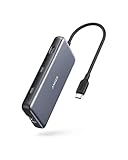
- Flawless 4K Video via HDMI: Enjoy crystal-clear visuals with 4K@60Hz output when using a DP 1.4 laptop, or 4K@30Hz with a DP 1.2 laptop—perfect for high-definition presentations and entertainment. (Note: Only the HDMI port supports video output. The USB-C port is for data transfer only.)
- Massive Expansion: Equipped with a USB-C Power Delivery input port, a built-in 7.48″ USB-C cable, a USB-C data port, 2 USB-A data ports, 1 HDMI port, an Ethernet port, and a microSD/SD card reader, giving you an incredible range of functions—all from a single USB-C port.
- High-Speed, High-Def: USB-C and USB-A data ports provide file transfer at speeds up to 10 Gbps, while an HDMI port supports media display at resolutions up to 4K@60Hz for DP 1.4 laptops, or 4K@30Hz for DP 1.2 laptops.


A lot of folks say this hub’s got solid data speeds and feels built to last, but a few run into random connection quirks with certain gadgets. It’ll juice up your laptop and handle high-res displays if you’ve got a beefy enough charger, but don’t expect it to play nice with Linux.
Bottom Line
If you’re after a one-stop solution to plug in all your stuff, the Anker 555 Hub nails the basics: convenience, decent performance, and a nice mix of ports. Check out the Anker 555 Hub on Amazon.
Overview of the Anker 555 USB-C Hub (8-in-1)
This little guy offers a bunch of connection options for anyone juggling a handful of devices. The 8-in-1 design means you get USB-C and USB-A data, HDMI, Ethernet, plus microSD and SD card readers. The 4K/60Hz HDMI is a sweet spot if you’re running an external screen.
For charging, it supports pass-through charging up to 85W (you’ll want a 100W brick for that). Some users gripe about power issues if you cheap out on the charger. Build quality is usually praised, though now and then there are compatibility headaches with certain accessories.
Massive Expansion and Port Variety
With a wide range of ports, this USB-C hub covers pretty much all the basics—power delivery, HDMI, Ethernet, USB-C and USB-A, and card slots for both microSD and SD.
It’s handy if you’re the type who always has three or four things plugged in. Only catch? The ports are packed in tight, so chunky cables or adapters can get a bit crowded.
If you’re always swapping peripherals, it’s a good fit. But if you need more space between ports or some unusual connection, you might end up a little frustrated. MacBook Pro owners and similar laptop users probably get the most out of it—it’s like the expansion Apple forgot to include.
High-Speed Data Transfer Performance
Moving big files? The Anker hub handles fast data transfers across its ports, which is a lifesaver for anyone working with photos, videos, or just a ton of documents. People mention that both USB-C and USB-A deliver solid speeds—no major slowdowns unless you’re maxing out every port at once.
Of course, if you plug in a bunch of devices, transfer rates can dip. And depending on your laptop, results might vary. Still, for most day-to-day stuff, it’s fast enough to keep you from pulling your hair out.
4K HDMI Output for Crystal-Clear Display
Hooking up to a monitor? This hub supports 4K output at 60Hz—great for crisp workspaces or streaming. Most users say the video signal is steady and setup is a breeze.
That said, your mileage may vary based on the HDMI cable and display you use. A few people run into issues with certain laptops, but it’s not a widespread thing. For the average setup, the HDMI port just works.
Efficient Power Delivery Charging
If you want to charge your laptop and gadgets while using the hub, the Anker 555’s pass-through charging is a real perk. It supports USB-C Power Delivery, so you can keep working without hunting for another outlet.
Just know that the hub keeps some power for itself, so you won’t get the full wattage out of your charger. To get the most out of it—especially with power-hungry devices—spring for a 100W charger. For regular office use, though, most folks say charging is stable.
Pros:
- One cable for charging and data
- Works with a bunch of laptops
Cons:
- Needs a beefy charger for best results
- Charging speed drops if you overload it
Broad Device Compatibility
Compatibility is a plus here. The Anker 555 works with MacBook Air, other laptops, and plenty of tablets, so it’s flexible for mixed-device setups.
A handful of buyers mention that older or off-brand devices might not play along perfectly. Still, on common laptops and tablets, it’s pretty much plug and play.
Pros
- Plays nice with major brands
- Handy for device hoppers
Cons
- Not guaranteed to work with every model
- Double-check if you’re using older gear
Reliability and Build Quality
This hub’s compact and fits just about anywhere. People often mention the sturdy build—it feels like it could take a few knocks.
Most users get reliable connections, but you’ll see the odd complaint about a port not being recognized or a weird compatibility quirk now and then. Power delivery usually works as advertised, but sometimes it’s a bit finicky depending on your setup.
All in all, the Anker 555 comes across as well-made, but it’s not totally immune to the occasional hiccup.
Pros and Cons
Pros
- Super versatile: handles charging, file transfer, video, networking, memory cards—all from one USB-C port.
- Data transfer up to 10Gbps on USB-C and USB-A is quick and dependable.
- HDMI supports 4K at 60Hz (on compatible laptops), which is great for high-res monitors.
- Compact and feels solid, according to a lot of reviews.
- Works with Mac, Windows, ChromeOS, and most new laptops.
| Feature | User Impression |
|---|---|
| Number of Ports | Widely appreciated |
| Data Transfer Speed | Reported as consistent & fast |
| 4K HDMI Video Out | Positive user feedback |
| Build Quality | Reliable and sturdy feel |
Cons
- Some users get input lag or funky connections with certain peripherals (like keyboards or drives).
- Full performance needs a 100W charger, which not everyone has lying around.
- Can be picky with Linux or older laptops.
- HDMI and USB-C ports aren’t always flawless with every monitor or accessory.
Cons Table:
| Issue | How it Affects Use |
|---|---|
| Input lag with peripherals | May impact typing experience |
| High power needs | Not ideal for all chargers |
| Compatibility limitations | Some devices not supported |
| Video output inconsistencies | Potential connection problems |
Customer Reviews
A lot of users are happy with the Anker 555’s performance and build. They mention stable connections, speedy data transfers, and like the 4K HDMI and 100W charging features.
Some folks have bought more than one for different setups and report a consistent experience. On the flip side, a few complain about peripherals not being recognized or occasional HDMI hiccups.
With a 4.3 out of 5-star average across 8,000+ reviews, most people seem satisfied, though there are scattered complaints about device compatibility.
Frequently Asked Questions
Got questions about daily use or whether this hub fits your setup? Here’s what people ask most.
What are the connectivity options available on the Anker 555 8-in-1 USB-C Hub?
You get a bunch of ports in a small package: USB-C and USB-A for fast data, SD and microSD card slots, Ethernet, and HDMI. Just note, it’s not made for Linux, but it works with most laptops running macOS, Windows, or ChromeOS.
How does the Anker 555 USB-C Hub perform with high-intensity tasks, such as gaming?
For high-bandwidth stuff, the hub generally keeps up. USB ports are fast, HDMI handles HD displays without much lag. Still, some users notice issues with input devices (like keyboards) if you’re really pushing it. Probably not the top pick for hardcore gaming rigs, but fine for everyday work and streaming.
Is an external power source required for the Anker 555 USB-C Hub to function?
It uses pass-through charging, so you don’t need a separate power supply—but you’ll want a 100W USB-C charger to get the best out of it, especially if you’ve got a lot plugged in. The hub takes about 15W for itself, so weaker chargers might leave your laptop underpowered.
How does the Anker 555 USB-C Hub manage HDMI display outputs?
The HDMI port does up to 4K at 60Hz if your device supports DP 1.4. If you’re stuck with DP 1.2, you’re capped at 30Hz. Most people find the video connection stable, but a few run into trouble with certain laptops or monitors. It’s reliable for most office and media setups, but not perfect for every scenario.
Can the Anker 555 USB-C Hub charge devices while transferring data?
Yep, it can charge your laptop and move files at the same time, which is super handy. With a strong enough charger, you get up to 85W pass-through while still running fast data. If your charger isn’t up to snuff, though, you might see slower charging. It’s a nice feature, but make sure your gear supports Power Delivery.
How does the Anker 555 USB-C Hub compare to Satechi hubs in terms of performance and quality?
Compared to Satechi, the Anker hub really stands out for its price and how reliably it handles everyday tasks. Satechi’s hubs do look a bit sleeker, and you can tell they’re made with higher-end materials, but the Anker 555 manages to hit a sweet spot between cost and features.
Both brands have good reputations, honestly. Folks often mention that Anker just works—no drama, no fuss, and you don’t feel like you’re overspending. Satechi might edge out Anker if you care a lot about matching your MacBook’s style or want that extra-polished finish, but unless you’re picky about aesthetics, the Anker 555 covers most connectivity and charging needs without much to complain about.


