
Finding the right USB-C hub can really make life easier, especially if you’re bouncing between laptops, tablets, and a handful of accessories. The Anker 7-in-1 Hub promises to keep things simple for folks who want more connections without lugging around a bulky dock.
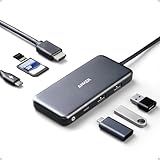
- The Anker Advantage: Join the 80 million+ powered by our leading technology.
- Massive Expansion: Get way more out of your laptop’s USB-C port with 4K HDMI, SD card connectivity, USB-A / USB-C data ports, as well as high-speed pass-through charging with Power Delivery.
- Pass-Through Charging: Compatible with USB-C Power Delivery to provide high-speed pass-through charging to your laptop at up to 85W.

People seem to like the mix of ports packed into this slim shell. HDMI output, SD card slots, and speedy data transfer all come in handy for daily work or travel. The casing feels solid and doesn’t heat up much, though some folks think the lightweight build feels a bit cheap, and a few have run into issues with power-hungry setups.
Overview: Anker USB C Hub (7-in-1)
This hub expands a laptop’s connectivity with extra ports for USB, HDMI, and memory cards. The compact design means you can toss it in a bag without much thought, but it still handles a surprising range of accessories and displays.
Users appreciate being able to connect multiple devices at once and mention reliable data transfer speeds. Some mention it feels less substantial than they’d hoped, but it gets the job done for most daily tasks. There are occasional quirks with compatibility, especially if you’re pushing the limits with power.
Comprehensive Port Selection
With so many gadgets using different connectors, having a hub that actually covers your needs is kind of a relief. The Anker hub supports both USB-C and older USB-A devices, so you’re not stuck leaving things behind.
Photographers or anyone who needs quick access to SD and microSD cards will appreciate the dedicated slots. The HDMI port lets you set up an extra monitor with little hassle, but you’re limited to one display at a time.
If you’re plugging in several devices at once, the ports can get a little cramped. Still, it mostly covers what you need without making you hunt for extra adapters.
High-Speed Data Transfer
Transferring files is smooth sailing with this hub. It supports multiple data ports, and people say moving large files like photos or videos is reliably quick. That’s a real plus if you’re swapping media between devices all the time.
Having both USB-C and USB-A data ports means you’re not leaving older peripherals in the dust. If you try to transfer tons of files at once, things might slow down a bit, but for most everyday tasks, it holds up.
4K HDMI Output
Hooking up an external monitor is straightforward thanks to the HDMI port. Users say it’s easy to get up and running with 4K displays, and for most, the performance is sharp enough for work or streaming.
Some note that video quality—colors and clarity—compares well to standard HD, though it does depend a bit on your monitor and cables. If you’re running a lot through the hub at once, the HDMI signal can sometimes flicker, but that’s not the norm.
Key points:
- Easy setup for mainstream devices
- 4K output for sharper displays
- Video quality depends on your hardware
100W Power Delivery Support
Charging while using all your devices can be a pain, but the Anker hub’s 100W Power Delivery helps. It’s a step above a lot of cheaper alternatives, letting you charge your laptop while you’re plugged into everything else.
Most users find their laptops charge at almost full speed, even with other peripherals connected. But charging speed will always depend on your charger and your laptop—no surprise there.
If you’re maxing out the hub with lots of accessories, charging output might dip a little. It’s generally reliable, but don’t expect miracles if you’re pushing every port at once.
Premium Aluminum Design
The aluminum shell gives this hub a sturdy feel and helps keep it cool. It looks right at home next to most modern laptops, and the finish is pretty sleek.
Downside? Aluminum can pick up fingerprints and scratches more easily than plastic. It’s slim and looks premium, but it can get a bit warm with heavy use. Still, the design feels like a good mix of durability and style.
Portable and Travel-Friendly
If you’re always on the move, the Anker Hub is easy to toss in your bag. It barely adds any weight, which is something several reviewers seem to appreciate.
The aluminum build feels tough enough for daily travel, though some wish the cable was just a bit shorter for tight workspaces. It’s portable for sure, but there are even smaller options out there if you’re really pressed for space.
Device Compatibility
Plug-and-play is the name of the game here. The hub works with a bunch of laptops, tablets, and some smartphones. People report it connects smoothly with the usual suspects—MacBook Air, MacBook Pro, XPS, and so on. Windows 10 and macOS are both supported, which is handy.
It’s not perfect though. Some tablets and phones won’t support every feature, like video output. If you’re using less common hardware, it’s worth double-checking compatibility first.
Pros and Cons
Pros
- Seven ports in one compact hub—super handy for connecting displays, USB drives, SD cards, and more, without dragging around a pile of adapters.
- Design quality gets good marks, especially for the aluminum casing. It feels sturdy, and the small size is a bonus for travel or swapping between workspaces.
- Fast data transfer is a standout, especially for SD and microSD cards. The 100W Power Delivery is a real perk for charging while you’re using everything else.
- Wide compatibility with laptops, tablets, and even some gaming devices is another plus.
| Feature | User Perception |
|---|---|
| Port Variety | Very Convenient |
| Build Quality | Durable, Premium |
| Portability | Highly Portable |
| Charging Support | Useful Addition |
| Compatibility | Wide Range Supported |
Cons
- Some users run into power requirements—certain laptops may warn that the hub needs a beefier adapter for best results, especially if you’re plugging in a bunch of high-draw devices.
- It’s lightweight, which is great for carrying but might not feel as “premium” as some expect.
- A few people mention that charging doesn’t always work with every tablet or phone, so your mileage may vary depending on device compatibility and power needs.
- Not all features work on every laptop or tablet; performance depends on your device’s own power delivery and port specs.
Summary of potential drawbacks:
- Might need a higher power adapter for full functionality
- Lightweight feel isn’t for everyone
- Charging ability varies by device
- Compatibility and speed can depend on your setup
Customer Reviews
A lot of customers like the compact size and sturdy build, finding it works well with laptops, tablets, and even game consoles. People mention reliable performance across different ports and appreciate having all these connections in one spot. Smooth data transfers and decent heat management come up a lot.
On the flip side, some say the lightweight feel isn’t their favorite, and there are a few complaints about power delivery limitations—like certain laptops wanting more juice than the hub provides. Still, the high ratings and consistent feedback on versatility suggest most buyers are happy with what they get.
Conclusion
If versatility is what you’re after, this Anker hub really pulls its weight. It fits a bunch of devices and handles different connections in a compact package. Users mostly say the data transfer and charging features work as promised, making life easier whether you’re at home or on the go.
There are a few minor gripes—occasional compatibility warnings on some laptops, or that lightweight feel that not everyone loves. But reliability and steady connectivity come up again and again as positives. For anyone needing more ports without crowding their desk, this hub seems to tick most boxes, at least based on what users are saying.
Frequently Asked Questions
What are the available ports on the Anker 7-in-1 USB C Hub?
People often want a quick rundown of what they’re actually getting. The Anker 7-in-1 Hub includes:
- 1 USB-C port (for power delivery)
- 2 USB-A ports
- 1 HDMI port
- 1 microSD card reader
- 1 SD card reader
This setup covers most laptop, tablet, and smartphone needs, but if you need something more unusual, you might need to look elsewhere.
Does the Anker 7-in-1 USB C Hub support high-resolution HDMI output?
Yes, the HDMI port handles 4K video output, which is great for hooking up to external displays. Most people find the 4K feature works well, but some devices might limit you to lower resolutions depending on their settings.
Can the Anker USB C Hub charge a laptop while connected?
The USB-C port supports power delivery passthrough—up to 100W. That’s usually enough to charge your laptop while using other ports. In rare cases, high-end laptops or tablets might want more power than the hub can provide, so you could see a warning or slower charging. It works best with devices that play nice with USB-C charging standards.
What is the data transfer speed of the Anker 7-in-1 USB C Hub?
Both USB-A and USB-C ports can hit up to 5 Gbps in ideal conditions. That’s plenty for most file transfers from SSDs or memory cards. Real-world speeds depend on your devices and cables, and things might slow down if you’re using a bunch of ports at once.
How does the build quality of the Anker 7-in-1 USB C Hub compare to other brands?
People tend to point out the aluminum casing—honestly, it’s a nice touch and feels a lot sturdier than those cheap plastic hubs you see everywhere. It handles heat better too, which is always a plus. That said, it’s surprisingly light. Some folks like that for portability, others wonder if it’s a bit too lightweight to feel truly robust. Still, it doesn’t come off as flimsy.
Is there any warranty or customer support provided with the Anker 7-in-1 USB C Hub?
If you’re eyeing this hub, you’re probably wondering about support. Anker’s got a pretty solid rep for customer service, honestly. The hub itself comes with the usual warranty you’d expect from most tech accessories, but the exact length and details might shift depending on where you live. It’s worth double-checking the return policy and support specifics in your region—sometimes the fine print matters more than you’d think.


