
Traveling with the right technology can make trips more productive and enjoyable. A laptop designed for travel needs to balance portability with performance while fitting into the constraints of life on the move. Whether working remotely from coffee shops or catching up on emails during layovers, portable laptops have become essential tools. The right travel laptop becomes a constant companion for digital nomads on the move. Choosing a lightweight laptop for travel helps reduce fatigue during long transit days between destinations.
The ideal travel laptop weighs under three pounds, offers at least eight hours of battery life, and includes enough processing power for typical tasks like web browsing, document editing, and video calls. Size matters significantly when packing a carry-on bag or backpack, so most travelers prefer models with 13- or 14-inch screens rather than bulkier 15-inch versions. Build quality also deserves attention since laptops endure more bumps and jostling during travel than they would sitting on a home desk.
The key considerations when choosing a travel laptop include durability, connectivity options, and how quickly it can charge. Some models charge via USB-C, which means carrying one universal charger for multiple devices. Screen quality affects usability in various lighting conditions, from bright airplane cabins to dim hotel rooms. Based on extensive testing and real-world travel scenarios, the following laptops represent the best options currently available across different price points and use cases.
Best Laptops for Travelling
Below is our full list of the best laptops for travelling. These models have been selected based on their portability, battery life, durability, and performance to meet the needs of frequent travelers.

- Ready, Set Go!: Say hi to the all-new Swift Go 14 AMD—your AI PC featuring AMD Ryzen 7 8845HS processor equipped with Ryzen AI. A visually brilliant 14" WUXGA (1920 x 1200) 100% sRGB touch display and designed in an eye-catching, thin-and-light body with Windows 11 and Copilot for Windows that’s great on the go!
- Premium Performance on the Go: With the unparalleled performance of the AMD Ryzen 7 8845HS processor and built-in AMD Radeon 780M Graphics, the Swift Go 14 AI PC delivers premium experiences and optimized power performance—so you can effortlessly breeze through the most demanding of tasks.
- Indulge Your Eyes: The Swift Go 14 with a 14-inch 16:10 WUXGA (1920 x 1200) touchscreen display offers vivid color accuracy, remarkably deep blacks, and ultra-crisp image quality. The intuitive touchscreen provides effortless tapping and swiping.
Acer Swift Go 14

This lightweight laptop offers solid performance and portability at a competitive price point, making it a practical choice for travelers who need reliable computing power on the go.
Pros
-
Weighs only 2.76 pounds with a slim 0.59-inch profile that slips easily into bags
-
Touch-enabled display with accurate color reproduction provides flexible interaction options
-
Fast charging capability helps minimize downtime during travel
Cons
-
Battery drains quickly when stored unused, requiring a charge before use
-
Keyboard exhibits occasional sticking and clicking issues that affect typing experience
-
Limited to integrated graphics which restricts demanding visual workloads
The Acer Swift Go 14 positions itself as a travel-friendly option with its aluminum construction and minimal weight. The AMD Ryzen 7 8845HS processor handles everyday tasks efficiently, from document editing to video calls. Its 14-inch screen strikes a balance between viewability and portability.
The touchscreen display offers a 16:10 aspect ratio at 1920 x 1200 resolution. This configuration provides extra vertical space compared to standard displays, which benefits productivity tasks. The inclusion of 16GB LPDDR5X memory and a 1TB storage drive means the system handles multitasking without significant slowdowns.
Connectivity options include USB4-capable Type-C ports and USB 3.2 ports for peripheral devices. The fingerprint reader built into the power button adds security without requiring extra steps. Wi-Fi 6E support ensures fast wireless connections in compatible environments.
The 1440p webcam with privacy shutter addresses video conferencing needs. AI-powered noise reduction and background blur features help maintain professional appearances during calls. However, the best AI-capable ultrabook considerations extend beyond just camera quality.
Battery performance reaches approximately 9.5 hours under typical usage conditions. Some users report complete battery drain when the laptop sits unused for extended periods. This characteristic requires planning ahead for trips where daily charging might not occur.
Build quality shows mixed results. The aluminum chassis feels sturdy and the OceanGlass touchpad demonstrates environmental consideration. Yet keyboard reliability concerns emerge in user feedback, with reports of inconsistent key response affecting the typing experience for some owners.

- 16GB RAM | 512GB SSD
- Equipped With The Most Powerful and Fast Qualcomm 8-core Snapdragon X Plus X1P 42 100 Processor
- 14" WUXGA (1920x1200) OLED (600nits HDR Peak Brightness, VESA CERTIFIED Display HDR True Black 600, 100% DCI-P3, Glossy), Integrated Qualcomm Adreno GPU
ASUS Zenbook A14
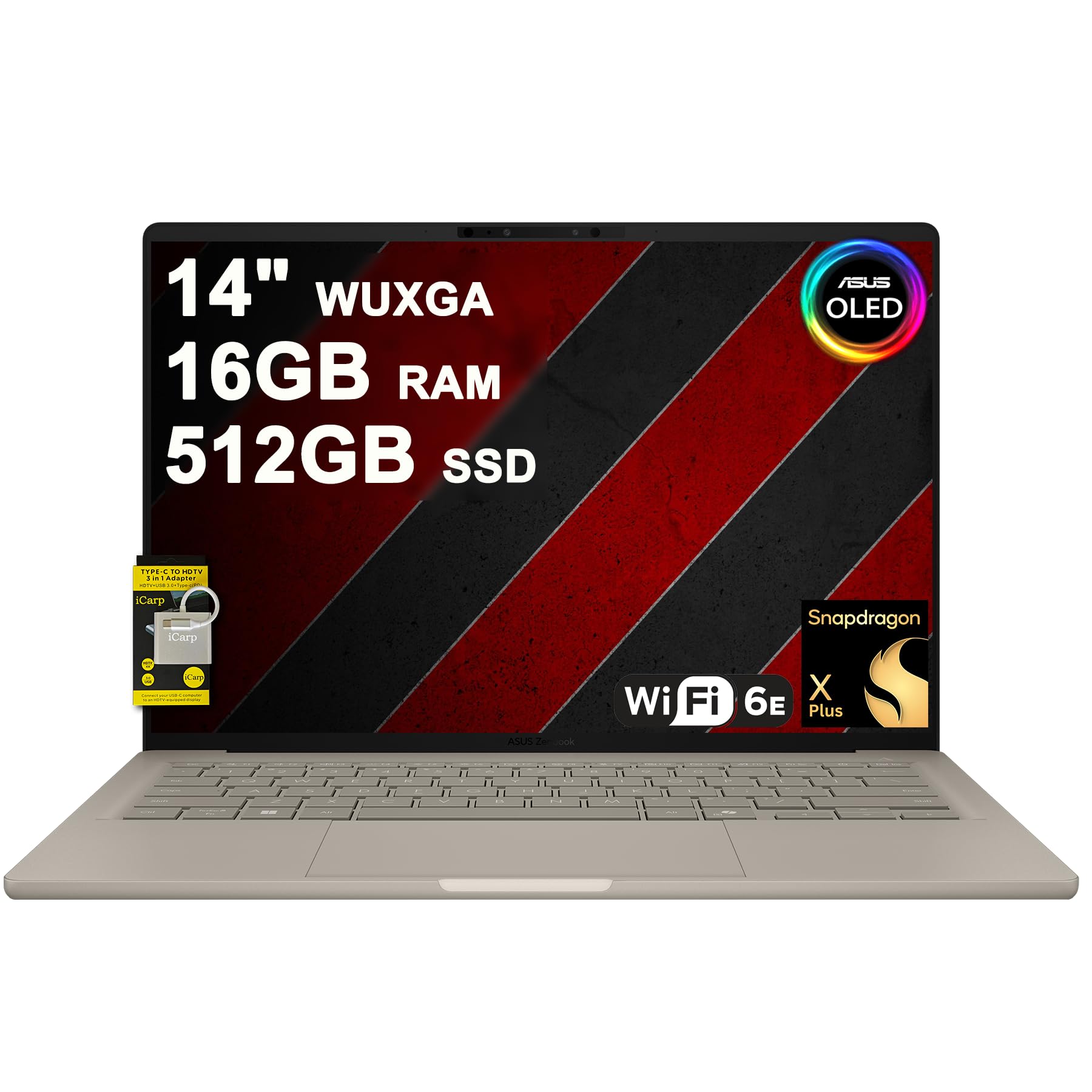
The ASUS Zenbook A14 combines exceptional portability with solid performance for travelers who need reliable computing on the go.
Pros
-
Remarkably lightweight at 2.4 pounds with ultra-slim profile
-
Vibrant OLED touchscreen delivers stunning color accuracy and brightness
-
Extended battery capacity supports all-day productivity without hunting for outlets
Cons
-
Qualcomm Snapdragon processor may have compatibility issues with some legacy software
-
Glossy display can create distracting reflections in bright environments
-
Limited port selection could require adapters for certain peripherals
The ASUS Zenbook A14 stands out as a compelling option for travelers who prioritize weight savings without sacrificing screen quality. At just 2.4 pounds and 0.63 inches thick, this machine slides easily into bags and backpacks. The OLED panel offers impressive visuals with 600 nits peak brightness and full DCI-P3 color coverage, making it suitable for creative work while traveling.
Qualcomm\’s Snapdragon X Plus processor represents a departure from traditional Intel or AMD chips. This ARM-based approach delivers energy efficiency that extends battery life considerably. The 70Wh battery capacity combined with the efficient processor architecture means users can work through long flights or train rides.
The 16GB DDR5 memory and 512GB storage provide adequate space for most travel workflows. Connectivity options include two Thunderbolt 4 ports, one USB-A port, and HDMI 2.1 output. Wi-Fi 6E ensures fast wireless connections in compatible environments.
The backlit keyboard facilitates work in dimly lit cabins or hotel rooms. The FHD IR camera supports Windows Hello facial recognition for quick logins. Those considering this lightweight laptop should verify that their essential applications run properly on ARM architecture before purchasing.
Build quality appears solid based on user feedback, though the aluminum construction adds slightly more weight than some plastic alternatives. The touchscreen functionality adds versatility for navigation and creative tasks. Battery performance varies depending on usage patterns, with lighter tasks extending runtime considerably compared to demanding applications.

- Unopened retail packaging, sold as configured by Lenovo. One Year Courier or Carry-in Lenovo Warranty. Add up to 5 years of coverage when you register your computer with Lenovo.
- Powered by the high performing Intel Core Ultra 7 258V processor, the Yoga 9i 2-in-1 laptop is ready to take on any challenge, big or small. It unlocks maximum performance and creative efficiency, it has plenty of memory with 32 GB and even more storage with 1 TB.
- The 14″ 2.8K OLED touchscreen display brings sharp clarity and bold colors, with 100% P3 for spot-on color accuracy. The adaptive refresh rate (30Hz-120Hz) adapts to your flow, and with up to 1,100 nits of brightness, even sunlight won’t dull your screen.
Lenovo Yoga 9i 2-in-1 Aura Edition
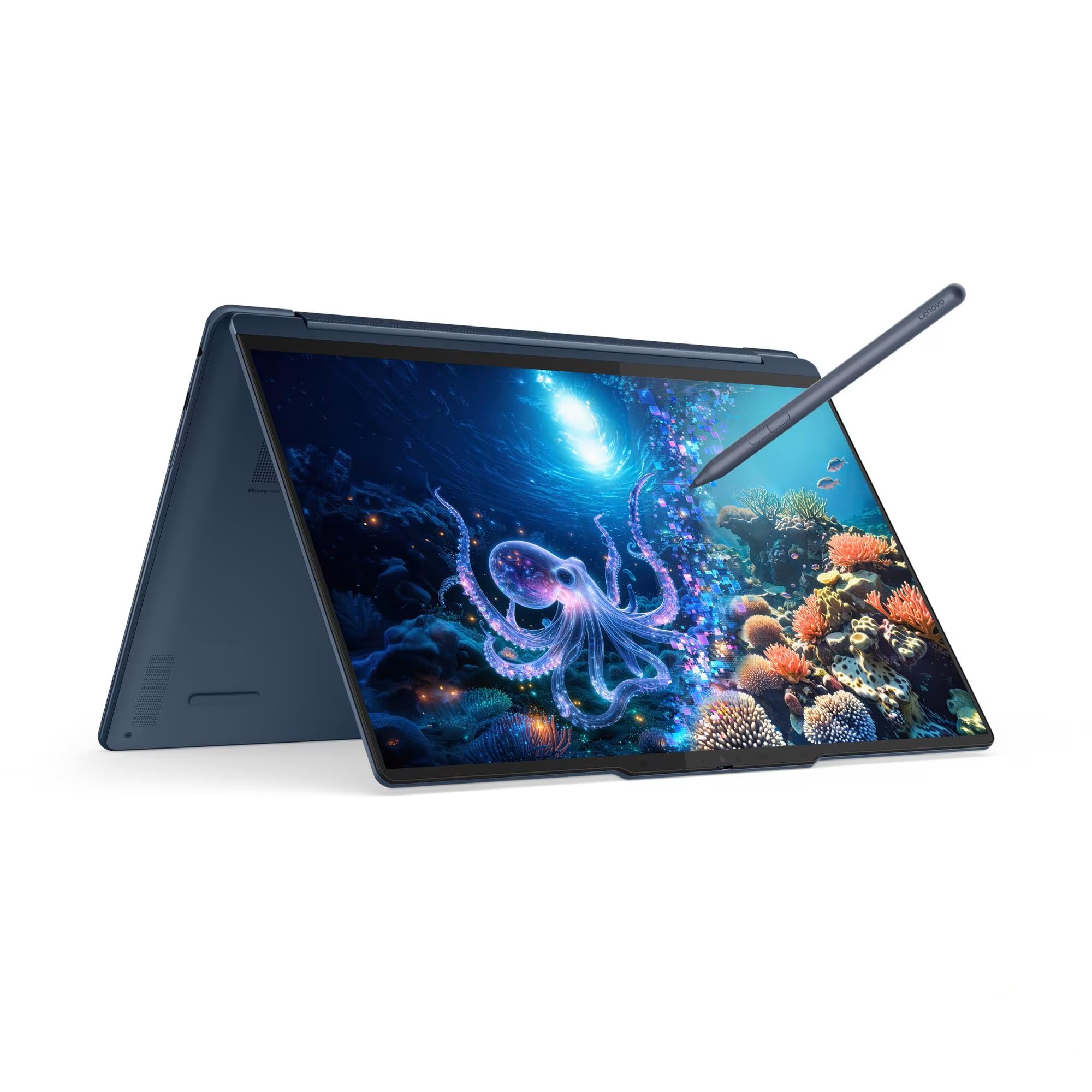
The Lenovo Yoga 9i 2-in-1 Aura Edition earns consideration from travelers who want a versatile machine that doesn\’t sacrifice performance for portability.
Pros
-
Lightweight design at approximately 3 pounds makes it easy to carry through airports and meetings
-
Brilliant OLED touchscreen with exceptional brightness handles outdoor viewing conditions
-
Comprehensive port selection includes Thunderbolt 4 and traditional USB-A for legacy devices
Cons
-
Limited customer feedback makes it difficult to assess long-term reliability
-
Premium pricing positions it above budget-conscious travelers
-
Customer service concerns have been raised by some buyers
This convertible laptop stands out with its slim profile measuring just 0.63 inches thick. The Intel Core Ultra 7 processor paired with 32GB of memory handles demanding applications without breaking a sweat. Travelers who need to edit photos, manage spreadsheets, or run multiple browser tabs will find the performance adequate for professional work.
The 14-inch OLED display delivers sharp visuals with a 2.8K resolution that makes text crisp and colors vibrant. Peak brightness reaching 1,100 nits in HDR mode means the screen remains visible even in bright environments like coffee shops or outdoor workspaces. The adaptive refresh rate between 30Hz and 120Hz adjusts based on content to balance smooth visuals with battery conservation.
Port variety gives this laptop flexibility that many ultraportables lack. Two Thunderbolt 4 ports handle high-speed data transfer and external displays, while the USB-A port accommodates older peripherals without requiring dongles. The 75Wh battery provides solid endurance for a machine this thin, though heavy users should still pack the charger for long travel days.
The included Yoga Pen adds functionality for those who sketch, take handwritten notes, or mark up documents. It attaches magnetically to the laptop lid for storage and features tilt detection for natural drawing angles. The 2-in-1 form factor lets users flip the screen around for tablet mode, which works well for presentations or casual browsing.
Build quality reflects the premium price point with attention to details like the backlit keyboard featuring 1.5mm key travel. The rotating soundbar houses four speakers with Dolby Atmos support, delivering audio quality that exceeds typical laptop standards. Noise-cancelling microphones help maintain call clarity in noisy environments like airports or busy cafes.
The Cosmic Blue color gives the laptop a distinctive appearance that stands apart from standard silver or black machines. Wi-Fi 7 support ensures fast wireless connectivity in compatible networks, while Bluetooth 5.4 handles peripheral connections efficiently. Windows 11 Pro comes pre-installed, offering business features like BitLocker encryption and remote desktop capabilities.

- SPEED OF LIGHTNESS — MacBook Air with the M4 chip lets you blaze through work and play. With Apple Intelligence,* up to 18 hours of battery life,* and an incredibly portable design, you can take on anything, anywhere.
- SUPERCHARGED BY M4 — The Apple M4 chip brings even more speed and fluidity to everything you do, like working between multiple apps, editing videos, or playing graphically demanding games.
- BUILT FOR APPLE INTELLIGENCE — Apple Intelligence is the personal intelligence system that helps you write, express yourself, and get things done effortlessly. With groundbreaking privacy protections, it gives you peace of mind that no one else can access your data — not even Apple.*
MacBook Air 13-inch with M4

The MacBook Air with M4 chip offers remarkable portability and battery endurance, making it a strong contender for travelers who prioritize lightweight design without sacrificing performance.
Pros
-
Exceptional 18-hour battery life keeps the laptop running through long flights and work sessions
-
Weighs just 2.73 pounds with a slim profile that slips easily into bags
-
M4 chip handles multitasking and creative applications smoothly
Cons
-
Midnight color finish shows fingerprints and smudges easily
-
Premium pricing puts it at the higher end of the market
-
Limited to two Thunderbolt ports may require adapters for some users
This laptop excels as a best laptop for travel option thanks to its ultralight construction and extended battery performance. The 13.6-inch Liquid Retina display delivers sharp text and vibrant colors, which helps during long editing sessions or video calls on the road.
The M4 chip provides noticeable speed improvements across applications, from productivity software to more demanding creative tools. The 16GB unified memory configuration handles multiple browser tabs, video conferencing, and document editing simultaneously without slowdowns. Storage at 512GB offers adequate space for travelers who need local file access without cloud dependency.
Apple\’s integration features work well for those already using iPhones or other devices in the ecosystem. The 12MP Center Stage camera tracks movement during video calls, while the four-speaker system with Spatial Audio delivers clear sound quality. MagSafe 3 charging adds convenience by magnetically attaching and releasing easily, reducing the risk of tripping hazards in cramped spaces.
The keyboard remains comfortable for extended typing sessions, and Touch ID provides quick authentication. Build quality feels solid, though the Midnight finish attracts visible fingerprints that require frequent wiping. The laptop maintains consistent performance whether plugged in or running on battery, which matters during travel when outlets aren\’t always available.

- The ThinkPad X1 Carbon Gen 13 Aura Edition weighs less than a kilogram, so you can manage it with one hand — and open it easily with one finger. But the best part? This super-thin laptop includes lots of connectivity options to hook up a monitor, quickly charge other devices, transfer files, and even plug in a headset if you’re old school.
Lenovo ThinkPad X1 Carbon Gen 13

Travelers seeking a premium ultraportable that balances power with portability will find this laptop delivers on both fronts.
Pros
-
Weighs under a kilogram making it exceptionally portable for frequent travelers
-
OLED display with sharp 2.8K resolution and vibrant color accuracy
-
Fast performance paired with generous memory and storage capacity
Cons
-
Premium pricing puts it at the higher end of the market
-
Lacks a SIM card slot for cellular connectivity on the go
-
Integrated graphics may limit demanding visual workloads
The ThinkPad X1 Carbon Gen 13 stands out as an ultraportable business laptop thanks to its featherweight design that won\’t strain a shoulder during airport sprints. The one-finger opening mechanism and one-handed portability make quick work of cramped airplane tray tables or coffee shop counters.
This machine packs substantial hardware into its slim profile. The Intel Core Ultra 7 processor handles multitasking without lag, while the LPDDR5X memory keeps applications responsive. That 2TB solid-state drive offers ample room for work files, presentations, and media without worrying about cloud access during flights.
The OLED screen brings content to life with deep blacks and brilliant colors that make long work sessions easier on the eyes. Its anti-glare coating helps when working near windows or under harsh airport lighting. The 120Hz refresh rate adds smoothness to everyday tasks like scrolling through documents or browsing.
Build quality reflects Lenovo\’s reputation for durable business machines. The backlit keyboard maintains the ThinkPad lineage of comfortable typing, while the fingerprint reader and infrared camera with privacy shutter address security concerns. WiFi 7 support future-proofs connectivity needs at hotels and conference centers.
Battery life supports all-day productivity without hunting for outlets. The laptop boots quickly and transitions from sleep instantly, which matters when working in short bursts between connections. Multiple USB ports including Thunderbolt options handle peripherals and charging needs without dongles.
Customer feedback points to solid construction and reliable performance, though some users expected more dramatic improvements over previous generations. The absence of cellular connectivity disappoints those who need internet access beyond WiFi hotspots. Price remains the main barrier for budget-conscious buyers, though the feature set justifies the investment for professionals who travel regularly.
Buying Guide
When selecting a laptop for travel, weight and portability should be primary considerations. High-quality portable laptops weighing under 3 pounds are ideal for frequent travelers who need to minimize luggage weight.
Battery Life
Long battery life is essential for working during flights or in locations without power outlets. Travelers should look for laptops offering at least 8-10 hours of real-world usage. Battery capacity ratings can be misleading, so checking independent reviews provides more accurate information.
Build Quality and Durability
A travel laptop needs to withstand the rigors of frequent movement and handling. Key durability features include:
-
Metal chassis for better protection against impacts
-
Reinforced hinges to prevent screen damage
-
Spill-resistant keyboards for accident protection
-
Solid-state drives instead of traditional hard drives to avoid mechanical failures
Screen Size and Resolution
Screen size affects both portability and usability. A 13-14 inch display offers the best balance between workspace and portability. Resolution should be at least 1920×1080 for comfortable reading and multitasking.
Performance Requirements
The processor and RAM determine how well the laptop handles tasks. If you are looking for a budget travel laptop, light users need only basic processors and 8GB RAM. Identifying the best budget laptop requires checking for essential ports and a screen that stays visible in sunlight. Content creators or professionals running demanding software should consider higher-end processors and 16GB or more RAM.
Connectivity Options
Travel laptops should include multiple USB ports, including at least one USB-C port for modern accessories. Built-in card readers and HDMI ports reduce the need for adapters. Reliable Wi-Fi and Bluetooth capabilities are non-negotiable for staying connected on the road.
Frequently Asked Questions
Travelers need specific features like long battery life, lightweight construction, and durable builds when selecting laptops for the road. Screen size, processing power, and portability vary depending on whether the laptop is used for business, content creation, or general use.
What are the best features to look for in a travel laptop?
A lightweight laptop for travel should weigh under 3.5 pounds and measure less than 0.7 inches thick for easy portability. Solid-state drives (SSDs) are essential because they\’re more durable than traditional hard drives and can withstand the bumps and movements common during travel.
Battery life of at least 10 hours ensures the laptop can handle long flights or workdays without access to power outlets. A sturdy build quality, ideally with military-grade durability certification like MIL-STD-810G, protects against drops and impacts.
Fast processors like Intel Core i5 or AMD Ryzen 5 handle multitasking efficiently without adding excessive weight. Sufficient RAM, typically 8GB minimum or 16GB for demanding tasks, keeps performance smooth across multiple applications.
How important is battery life in a laptop for frequent travelers?
Battery life ranks as one of the most critical factors for travelers who may spend hours in airports, on flights, or in locations without reliable power access. A laptop that lasts 12-15 hours on a single charge eliminates anxiety about finding outlets during long travel days.
Shorter battery life of 6-8 hours may require carrying chargers and actively seeking power sources throughout the day. Modern laptops with efficient processors and optimized power management can deliver extended battery performance without sacrificing processing capability.
USB-C charging compatibility adds flexibility since travelers can use the same charger for multiple devices. Some laptops support fast charging, providing several hours of use from just 30-60 minutes of charging time.
What are the top-rated laptops for business travel?
The Dell XPS 13 offers a combination of 12-hour battery life, a weight of 2.6 pounds, and robust performance with Intel Core processors. The Lenovo ThinkPad X1 Carbon features military-grade durability, weighs 2.48 pounds, and includes a keyboard designed for extended typing sessions.
The MacBook Air M2 delivers up to 18 hours of battery life and weighs just 2.7 pounds while maintaining powerful performance for business applications. The HP Elite Dragonfly G3 provides biometric security features, 5G connectivity options, and a convertible design for versatile use.
The Microsoft Surface Laptop 5 combines a premium build with touchscreen functionality and maintains compatibility with a full range of business software. Each of these models includes sufficient processing power for video conferencing, document editing, and productivity applications.
Which laptops are recommended for travel-related video editing?
The MacBook Pro 14-inch with M2 Pro or M3 chips handles 4K video editing efficiently while maintaining portability at 3.5 pounds. The Dell XPS 15 pairs a dedicated NVIDIA graphics card with a 15.6-inch 4K display, though it weighs 4.3 pounds.
The ASUS ROG Zephyrus G14 offers powerful AMD Ryzen processors and NVIDIA RTX graphics in a compact 3.64-pound chassis. These laptops include at least 16GB of RAM, with 32GB recommended for smoother editing of high-resolution footage.
Storage capacity of 512GB to 1TB SSD accommodates large video files and editing software. Color-accurate displays with 100% sRGB or Adobe RGB coverage ensure reliable color grading while traveling.
Are there travel laptops that combine durability with lightweight design?
The LG Gram 16 weighs just 2.6 pounds despite its 16-inch screen and meets military durability standards. The Lenovo ThinkPad X1 Nano weighs 1.99 pounds while featuring a carbon fiber and magnesium chassis that passes 12 military testing standards.
The Microsoft Surface Laptop Go 3 combines an aluminum body with a weight of 2.45 pounds for everyday durability. The HP Elite Dragonfly is constructed from magnesium alloy, weighs 2.2 pounds, and includes drop resistance testing.
Manufacturers achieve this balance through materials like carbon fiber, magnesium alloy, and aluminum that provide strength without excess weight. These laptops typically include reinforced hinges and corner protection to withstand the rigors of frequent travel.
What is the ideal laptop screen size for ease of travel?
Screen sizes between 13 and 14 inches provide the best balance of portability and usable workspace for most travelers. These displays fit easily in standard laptop compartments of backpacks and carry-on bags while offering sufficient screen real estate for productivity tasks.
A 13-inch laptop typically measures around 11.97 x 8.36 inches in footprint, making it compact for airplane tray tables. The 14-inch option adds minimal bulk while providing noticeably more viewing area for spreadsheets and documents.
Travelers who prioritize extreme portability may opt for 11-12 inch screens, though these can feel cramped during extended work sessions. Those who need larger displays for design work or video editing might accept the trade-off of 15-16 inch screens, which increases weight to 3.5-4.5 pounds but delivers more comfortable viewing for detailed tasks.


