
Looking for a premium 2-in-1 laptop that balances portability with serious performance? The Yoga 9i Aura Edition packs an Intel Core Ultra 7 processor, 32GB of memory, and a 1TB SSD into a slim 0.63-inch frame.
It weighs around 3 pounds, which is just light enough to toss in a bag and go.
The real showstopper here is the 14-inch OLED touchscreen with 2.8K resolution and wild brightness—up to 1,100 nits in HDR mode. Color accuracy hits 100% DCI-P3, and the adaptive refresh rate swings from 30Hz to 120Hz, so it’s a treat for creative work or just binging shows.

- Unopened retail packaging, sold as configured by Lenovo. One Year Courier or Carry-in Lenovo Warranty. Add up to 5 years of coverage when you register your computer with Lenovo.
- Powered by the high performing Intel Core Ultra 7 258V processor, the Yoga 9i 2-in-1 laptop is ready to take on any challenge, big or small. It unlocks maximum performance and creative efficiency, it has plenty of memory with 32 GB and even more storage with 1 TB.
- The 14″ 2.8K OLED touchscreen display brings sharp clarity and bold colors, with 100% P3 for spot-on color accuracy. The adaptive refresh rate (30Hz-120Hz) adapts to your flow, and with up to 1,100 nits of brightness, even sunlight won’t dull your screen.
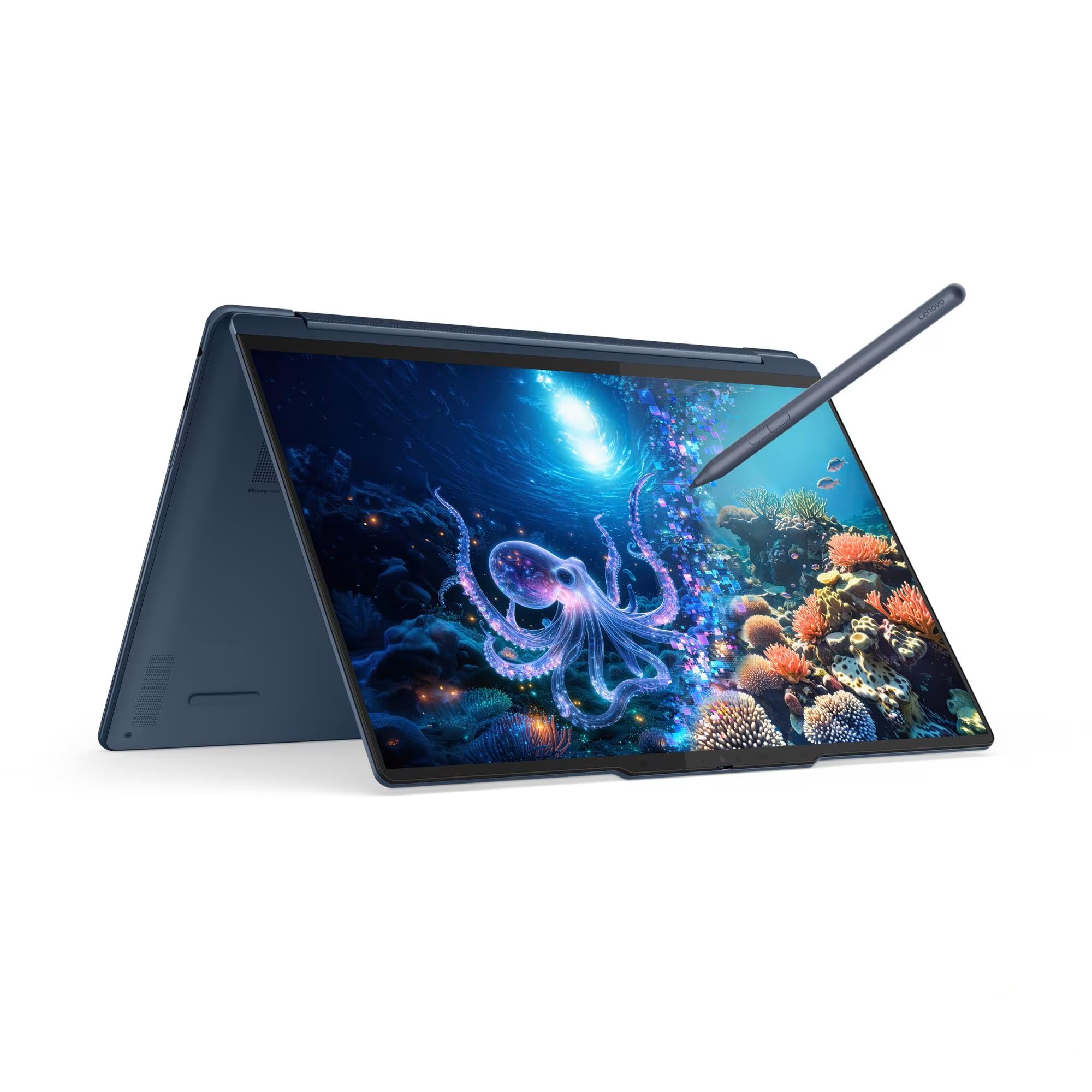
It comes loaded with Windows 11 Pro and the Lenovo Yoga Pen, which supports tilt and pressure detection. Connectivity is future-proofed: Wi-Fi 7, three USB-C ports (including two Thunderbolt 4), and a USB-A port are all here.
Graphics are handled by the integrated Intel Arc Graphics 140V, with Lenovo AI Core working in the background to juggle system resources. The keyboard’s been redesigned for 1.5mm key travel, and the rotating soundbar packs four Dolby Atmos speakers.
Customer feedback? It’s a bit all over the place, with a 3.8-star average from just a handful of reviews. Some folks love the build enough to buy a second, while others have had headaches with missing accessories or customer support.
Power comes from a 75Wh battery, and you get a fingerprint reader plus a 5MP IR camera with a privacy shutter. The Cosmic Blue finish is a nice touch—definitely stands out.
Overview of the Lenovo Yoga 9i 2-in-1 Aura Edition
This convertible is seriously thin at just 15.9mm but still manages to cram in high-end parts. There’s that Intel Core Ultra 7 258V, 32GB of LPDDR5X RAM, and a speedy 1TB SSD.
The 14-inch OLED screen pops with its 2.8K resolution and can get blindingly bright at 1,100 nits in HDR. It covers the whole DCI-P3 color range, and the refresh rate adapts from 30Hz to 120Hz.
Key Features:
- Weight: About 3 pounds
- Battery: 75Wh
- Stylus included, magnetically attached
- Wi-Fi 7 and Bluetooth 5.4
- Three USB-C ports (two are Thunderbolt 4)
Windows 11 Pro comes standard, and Lenovo AI Core is on board for smart resource management. Some buyers seem happy with the hardware, though accessory and support issues have popped up.
14-Inch 2.8K OLED Touchscreen Experience
The display is easily one of the Yoga 9i’s best parts. It’s sharp at 2880 x 1800, and the OLED panel delivers those deep blacks and vibrant colors that make photos and movies look stellar.
Brightness gets up to 1,100 nits in HDR mode, 500 nits in SDR, so it holds up even near a window. The adaptive refresh rate is a nice touch, keeping things smooth without draining the battery.
Touch input feels accurate, and the Yoga Pen pairs up seamlessly. HDR True Black 1000 certification means contrast and color depth are on point.
The glossy finish does reflect a bit, though—typical OLED stuff.
Performance and Intel Core Ultra 7 Processor
At the core is Intel’s new Ultra 7 258V, which is all about balancing speed with battery life. It can hit up to 4.8 GHz, so multitasking, content creation, and productivity tasks don’t faze it.
With 32GB of fast LPDDR5X RAM, the Yoga 9i doesn’t really sweat under pressure. Integrated graphics are fine for everyday visuals and some light creative work, but gamers or heavy-duty creators might want more.
The 1TB SSD is fast and roomy enough for most needs. Wi-Fi 7 means you’ll be set for the next-gen networks.
One oddity: the spec sheet mentions 6.09 pounds, which seems off for a 14-inch machine—maybe a typo, but worth checking if you’re weight-sensitive.
Advanced Lenovo AI Features
AI is everywhere these days, and the Yoga 9i isn’t missing out. Lenovo AI Core quietly manages system resources, deciding how to split tasks across CPU, NPU, GPU, and RAM.
Key AI Capabilities:
- Resource Management: Doles out power where it’s needed
- Security: Trusted AI Controller keeps data locked down
- Battery Optimization: Smarter charging to help the battery last longer
There’s Lenovo Smart Note, which lets you scribble and then uses AI to tidy up your sketches. Smart Share makes it easy to sling files between your phone and the laptop.
All of this runs locally—no cloud reliance, which is a relief if you care about privacy.
Copilot+ is also integrated, tossing in AI-powered suggestions and a bit of workflow automation.
Yoga Pen and Creative Tools
The included stylus is responsive, picking up both tilt and pressure. It clicks onto the lid magnetically, so you’re less likely to lose it.
Lenovo Smart Note is pretty handy for sketching or jotting down ideas, and it’ll use AI to clean up your doodles. Again, it all stays on-device.
The pen matches the Cosmic Blue finish, which is a nice touch. Magnetic attachment is simple but effective.
You get good pressure sensitivity and tilt recognition, so drawing feels natural. Still, at this price, some rivals throw in fancier pens or bundled creative software, which Lenovo doesn’t.
Premium Design and Portability
It’s clear Lenovo wanted this to look and feel high-end. At 15.9mm (0.63 inches) thin and about 3 pounds, it’s easy to slip into a backpack.
The Cosmic Blue finish is bold—way more interesting than silver or black. The hinge lets you flip the screen all the way around, so you can use it as a laptop or a tablet.
The Yoga Pen snaps right onto the lid, which is a small but thoughtful touch.
Key Physical Attributes:
- Thickness: 15.9mm (0.63 inches)
- Weight: 3 lbs
- Dimensions: 12.44 x 8.66 x 0.63 inches
The keyboard’s been reworked for 1.5mm key travel and has a special coating for durability. The rotating soundbar with four speakers is a cool addition, giving you Dolby Atmos audio no matter how you’re using the device.
Enhanced Connectivity and Ports
Connectivity is solid. Wi-Fi 7 is as fast as it gets right now, so you’ll be ready for crowded networks and high-speed downloads.
Three USB 3.0 ports give you a reasonable mix for plugging in gear. Bluetooth is on board for connecting wireless accessories.
There’s some mystery around the exact port types beyond USB 3.0, though. If you need HDMI, Thunderbolt, or SD card readers, double-check the specs before buying.
Wireless is covered, but physical port details could be clearer for folks with specific needs.
User Comfort Features
Lenovo’s tried to make the Yoga 9i comfortable for long stretches of use. The focus is on typing, sound, and communication.
Backlit Keyboard Design
The keyboard is backlit, so working in dim lighting isn’t a problem. With 1.5mm key travel, the typing experience is deeper than you’ll find on a lot of thin laptops.
Each key has a slight dish (0.3mm) to help your fingers find the right spot. There’s a durable coating too—feels like Lenovo put real thought into this.
Rotating Dolby Atmos Soundbar
The soundbar rotates as you flip the laptop into tablet or tent mode, so audio always faces the right way. Four speakers and Dolby Atmos support mean you actually get some spatial sound, not just tinny laptop audio.
It’s a different approach from the usual keyboard or bottom-mounted speakers. If you care about built-in audio, this could be a pleasant surprise.
Noise Cancelling Microphones
Multiple mics with noise cancelling tech are built in for video calls or voice input. They’re designed to cut out background noise, which is handy if you’re working somewhere busy.
Key microphone capabilities:
- Reduces background noise on calls
- Ties in with AI features for audio tweaks
- Picks up your voice clearly, whichever way you’re holding the device
Effectiveness depends on your environment, of course. There aren’t a ton of reviews yet—just a handful—but one buyer did say they were happy with their Yoga, though details on these features are sparse.
Pros and Cons
The Yoga 9i is packed with premium features, but there are trade-offs to keep in mind. Knowing the upsides and quirks helps you make a smarter choice.
Pros
The OLED touchscreen is a highlight—2.8K resolution, up to 1,100 nits, and full DCI-P3 color. It’s even usable outside, which isn’t always the case.
Performance is strong, thanks to the Intel Core Ultra 7 258V chip and 32GB RAM. The 1TB SSD should cover storage for most people.
Port selection is modern, including two Thunderbolt 4 ports (40Gbps), USB4 Gen 2×2, and a classic USB-A for older devices.
The Yoga Pen offers tilt and pressure detection, and it attaches magnetically. The redesigned keyboard feels good, and the rotating soundbar brings four Dolby Atmos speakers into the mix.
Lenovo AI Core keeps things running smoothly by managing resources across CPU, NPU, and GPU.
Cons
The 3.8 out of 5 stars rating hints at a pretty mixed bag from buyers. With just four ratings, it’s not a huge sample, but you can sense there’s some dissatisfaction in the air.
Customer service issues pop up in the reviews, too. One buyer mentioned missing accessories when ordering directly from Lenovo, which doesn’t exactly inspire confidence in their quality control or support.
The device ships with Windows 11 Pro. Some folks might find it a bit trickier to use than the Home edition. The 2-in-1 design is handy, but it tends to make the device heavier than your typical laptop.
Customer Reviews
The Yoga 9i draws mixed feedback and averages 3.8 stars across four reviews. One customer was so happy with their first Yoga that they bought a second, so clearly, the experience isn’t all bad.
On the flip side, another buyer was pretty frustrated about missing accessories in their order. They specifically called out the missing items and weren’t impressed with Lenovo’s support response.
With only a handful of reviews, it’s tough to spot any real trends in performance or quality. If you’re considering this laptop, just know the feedback is all over the place.
Frequently Asked Questions
How does the Lenovo Yoga 9i 2-in-1 Aura Edition compare with the Microsoft Surface Pro series in terms of performance and features?
The Yoga 9i and Surface Pro approach things differently. Surface Pro is basically a tablet with a kickstand, while the Yoga 9i is your classic convertible laptop sporting a 360-degree hinge.
The Yoga 9i comes with an Intel Core Ultra 7 258V processor, Arc Graphics 140V, 32GB memory, and 1TB storage by default. Surface Pro models let you pick and choose configurations, but the Yoga 9i’s specs are stacked out of the box.
One thing I like is the attached keyboard—no extra purchase needed. There are also two Thunderbolt 4 ports, which is more than you get on a lot of Surface models. Battery-wise, you get a 75Wh pack, which is pretty solid for a 14-inch machine.
The display’s a 2.8K OLED with HDR True Black 1000 and up to 1,100 nits brightness in HDR mode. Surface Pro usually sticks with LCD, except for some pricier models that go OLED.
What are the main improvements in the Lenovo Yoga 9i Aura Edition 2025 version compared to previous generations?
The Aura Edition brings a handful of updates over earlier Yoga 9i models. The new Intel Core Ultra 7 258V chip uses a fresher architecture and has dedicated AI processing via an NPU.
Lenovo AI Core is now on board, juggling resources across CPU, NPU, GPU, and RAM to keep things running smoothly and efficiently. That’s the idea, anyway.
The display can now hit 1,100 nits in HDR mode, which is much brighter than most laptops. The refresh rate adapts from 30Hz up to 120Hz depending on what you’re doing.
Wi-Fi 7 support is new, promising faster speeds than the previous Wi-Fi 6E. The keyboard’s been tweaked too, with 1.5mm key travel and a more comfortable keycap shape.
There’s also Smart Share, which lets you connect your phone to the laptop with a quick tap. The rotating soundbar with four Dolby Atmos speakers is still around, which is a nice touch for audio.
What are the advantages of the Lenovo Yoga 9i Aura Edition’s 14-inch Intel configuration for professionals?
The 14-inch size feels like a sweet spot—enough screen, still portable. At about 3 pounds and just over half an inch thick, it won’t weigh you down.
The Intel Core Ultra 7 258V can easily handle daily professional tasks—docs, spreadsheets, video calls, multitasking, you name it. With 32GB of LPDDR5X-8533MT/s memory (soldered, but plenty), you can run a bunch of apps at once.
Thunderbolt 4 ports mean you can hook up external displays, docks, or fast storage. There’s also a USB-A for your older gear, plus three USB-C ports for everything else.
The 2.8K OLED touchscreen is pen-friendly, which is great for jotting notes or marking up docs. The Lenovo Yoga Pen snaps magnetically onto the lid so you won’t lose it.
Battery life should be solid thanks to the 75Wh pack, which is bigger than most 14-inch laptops. Windows 11 Pro brings in business features like BitLocker and remote desktop, which some folks will really appreciate.
Can the Lenovo Yoga 9i Aura Edition (16-inch) handle demanding graphic design tasks smoothly?
This model’s a 14-incher, not 16. The integrated Intel Arc Graphics 140V does give you some GPU muscle, but it’s not a dedicated graphics card.
For graphic design—photo editing, vectors, layouts in Photoshop or Illustrator—the integrated graphics should be fine for moderate projects. The 32GB memory helps with big files, too.
But for heavy 3D modeling, intense video editing, or big rendering jobs, you’d want a laptop with a discrete GPU. The Arc Graphics 140V just isn’t built for that level of workload.
The OLED screen with 100% DCI-P3 color coverage is a big plus for color accuracy. And at 2.8K on 14 inches, you get crisp detail for design work.
What accessories, like cases or pens, are compatible with the Lenovo Yoga 9i Aura Edition?
You get a Lenovo Yoga Pen in Cosmic Blue included, and it magnetically sticks to the lid. It supports tilt and pressure detection, with low latency for drawing or notes.
Any sleeve or case for a 14-inch laptop should fit, since the Yoga 9i measures 12.44 x 8.66 x 0.63 inches. Just double-check the dimensions before buying.
USB-C docking stations are supported, and the two Thunderbolt 4 ports let you hook up high-bandwidth docks, multiple displays, ethernet, and more—all through one cable.
You can use USB-C chargers with Power Delivery 3.0, but charging speed depends on the wattage. External monitors plug in via Thunderbolt 4 or the USB4 Gen 2×2 port; both support DisplayPort.
Bluetooth 5.4 covers wireless mice, keyboards, headphones, and so on. There’s also a standard 3.5mm headphone jack for your wired audio gear.
Is the Lenovo Yoga 9i Aura Edition’s 2.8K OLED Touch display suitable for color-sensitive work?
The display covers the full DCI-P3 color gamut—yep, that’s the one used in digital cinema and most modern creative projects. That alone makes it a strong contender for anyone who needs accurate color.
Thanks to OLED tech, you get those deep, inky blacks and eye-popping contrast. It’s a real advantage when you’re picking apart shadows or subtle gradients in your images.
It’s also HDR True Black 1000 certified, so it’s not just marketing hype—there are real standards behind the performance. For brightness, you get 500 nits in SDR, and it can hit up to 1,100 nits in HDR mode, which is honestly plenty for just about any indoor scenario.


