
We spent some time with the Xerox C235dni, a color laser all-in-one that promises to tackle printing, scanning, copying, and faxing for home offices and small businesses.
There’s a 2.8-inch color touchscreen up front, which feels modern and keeps navigation simple enough. It also supports automatic two-sided printing on both letter and legal paper, which is a nice touch for saving paper.
Setup was mostly painless, thanks to the Xerox Easy Assist App. Still, a few folks mentioned having to hunt down and remove various plastic tabs and protective bits before that first test print—mildly annoying, but not a dealbreaker.
The printer connects over built-in Wi-Fi and supports Apple AirPrint, Mopria, and Chromebook printing. We tried it with a mix of devices, and it played nicely with all of them.

- ALL-IN-ONE FUNCTIONALITY FOR HOME AND OFFICE - The Xerox C235dni is a compact and quiet multifunction printer that can print, copy, scan fax and email. With print speeds of up to 22ppm in color and black & white it's ideal for small to medium-sized businesses and home offices. The printer supports automatic two-sided printing, has 250-sheet paper capacity, high resolution image quality and a recommended monthly print volume of up to 1,500 pages.
- EASY SET UP & SUPPORT: Set up your printer quickly and easily using the Xerox Easy Assist App. Access guided setup, real-time monitoring, and self-service support tools right from your mobile device - no need to wait for IT support.
- CONVENIENCE & CONNECTIVITY: Built-in Wi-Fi with Apple AirPrint, Mopria, and Chromebook support—plus easy setup with no IT needed.
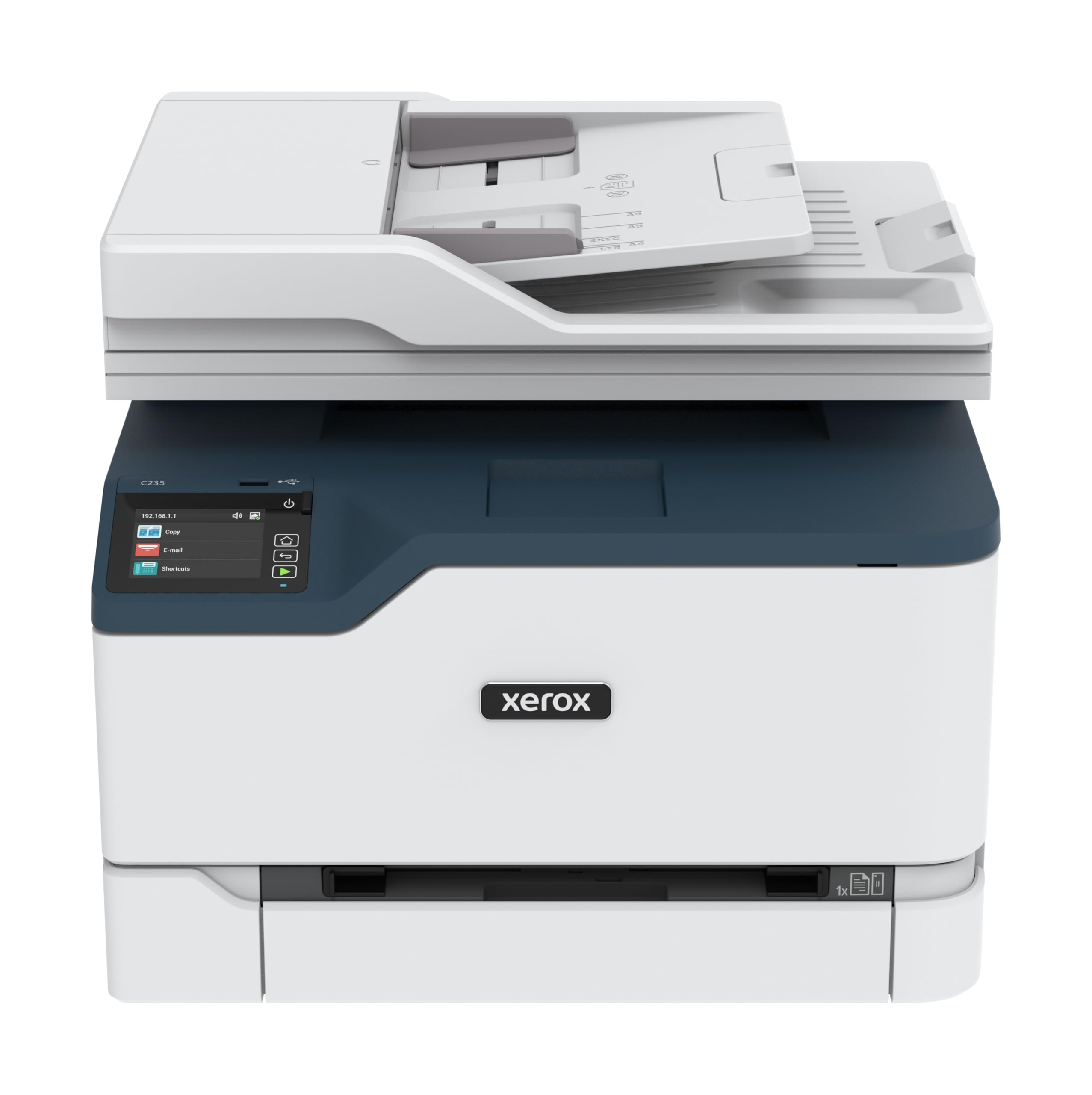
Print speeds top out at 22 pages per minute for both color and black-and-white. That’s plenty for most day-to-day office jobs.
The 250-sheet paper tray and 50-sheet auto document feeder mean you won’t be refilling constantly. Image quality is sharp at 1200 dpi for color and 600 dpi for black-and-white, so text and graphics come out crisp.
There’s a 1 GHz dual-core processor under the hood, paired with 512 MB of memory. The monthly duty cycle is up to 1,500 pages, which feels about right for a small office.
One thing to note: some people ran through the included starter toner cartridges pretty quickly, and replacements aren’t cheap. A few reviewers also had issues with paper jams tied to the rollers after a few months.
The device weighs about 35 pounds and measures 15.5 inches deep by 16.2 inches wide by 13.6 inches high. You’ll need to clear a little desk space for it.
Advanced security features are built in to protect your documents and data from cyber threats. There’s a standard one-year warranty, with the option to extend to three years if you register.
Click here to purchase the Xerox C235dni and add versatile color printing to your workspace.
Overview Of The Xerox C235dni Wireless Printer
This multifunction laser printer is made for small office environments. The C235dni covers printing, copying, scanning, and faxing, all at 22 pages per minute—color or black-and-white.
A 2.8-inch color touchscreen keeps things simple when moving through menus. There’s a 250-sheet paper tray and a 50-sheet automatic document feeder, which makes multi-page scanning a breeze.
Automatic duplex printing is built in, so you can cut down on paper waste for both letter and legal-sized documents.
Built-in Wi-Fi means setup is manageable, and it works with AirPrint, Mopria, and Chromebook devices. The 1 GHz dual-core processor and 512 MB of memory keep things moving for up to 1,500 pages per month.
One sticking point: those starter toner cartridges. Some users said they ran dry fast. Replacement toner isn’t cheap, but genuine Xerox supplies do qualify for recycling and extended warranty programs, which is a small consolation.
All-in-One Functionality
The C235dni covers printing, copying, scanning, faxing, and even emailing from a single compact unit.
For home offices or small businesses, it’s handy not to need a separate device for every function.
Key Capabilities:
- 22 ppm print and copy speeds, color or black-and-white
- Automatic two-sided printing to save paper
- 250-sheet paper tray for fewer refills
- Designed for up to 1,500 pages per month
Switching between functions on the color touchscreen is quick. It’s also quieter than you might expect, which is a relief if you share your space.
One thing to watch: the scanner is sheetfed, not flatbed. That limits what you can digitize—awkward for books or odd-sized items.
For standard business documents, though, it’s fine. If you regularly exceed the recommended monthly volume, you might want to look elsewhere.
Touchscreen Controls and Easy Setup
The color touchscreen interface is easy to use once you get the hang of it. Menus are clear, and the screen responds well to touch.
Most folks found setup straightforward, but a few needed to install drivers more than once before everything clicked. The Xerox Easy Assist App tries to make setup smoother, offering guided steps and real-time monitoring from your phone.
Wireless connectivity was solid during our time with it, and it worked with AirPrint, Mopria, and Chromebook printing.
One minor headache: finding and removing all the protective plastic before your first print. The instructions could be clearer here, honestly. Once that’s sorted, connecting to devices is a breeze.
Mobile Printing and Connectivity Options
Printing from your phone or tablet is simpler than you might expect. The C235dni supports wireless printing, so you can send files straight from mobile devices—no need to transfer to a computer first.
Wi-Fi and Ethernet are both on board, so you can pick what fits your setup. There’s also a USB port for direct cable connections.
During our tests, the wireless connection stayed steady. Setting up mobile devices took a few minutes but didn’t require any gymnastics.
The ability to print from multiple devices without swapping cables is just convenient, especially if you have a few people sharing the printer.
Productivity and Performance
The C235dni delivers a steady 22 pages per minute for both color and black-and-white. That’s fast enough for most small offices or home businesses.
With a 250-sheet paper tray, you won’t be refilling constantly. Automatic duplex printing is a time-saver, though some users ran into roller-related paper jams after a few months.
The multifunction capability keeps workflow streamlined—print, copy, scan, fax, all in one. The touchscreen makes job selection easy, and wireless connectivity means you can print from just about anywhere in your office.
The starter toner cartridges run out quicker than you’d hope. Some folks saw the black toner hit “low” after just 100-200 pages, which is annoying if you’re waiting on replacements.
Advanced Security Features
Security is built in, aimed at protecting your documents and data from online threats. For small businesses or home offices dealing with sensitive info, that’s reassuring.
These protections run in the background, so you don’t have to mess with them much. They watch for vulnerabilities and help prevent unauthorized access.
Key protections include:
- Data encryption for documents in transit
- Secure print release options
- Network authentication protocols
If document privacy is a concern, these features offer reasonable peace of mind. For bigger companies, though, you might want even more customization than what’s here.
Environmental Impact and Sustainability
The C235dni tries to keep its environmental footprint in check. It’s EPEAT certified, so it meets certain energy efficiency and manufacturing standards.
Key Sustainability Features:
- Automatic duplex printing to cut paper waste
- Xerox Supplies Recycling Program participation
- EPEAT environmental certification
Duplex printing made a real difference during testing, almost halving paper use for most jobs. Used toner cartridges can be shipped back to Xerox for recycling at no charge.
Energy use is fair for a color laser, though it’s more than an inkjet. The monthly volume recommendation helps avoid overuse and keeps the printer going longer.
It’s not perfect, but the C235dni offers more eco-friendly features than a lot of printers in this price range.
Pros And Cons
After a stretch with the C235dni, a few things stood out—good and bad.
Pros
The all-in-one design is genuinely handy. Printing, copying, scanning, and faxing all from one compact box makes life easier, especially if you’re short on space.
Wireless connectivity worked smoothly, and support for AirPrint, Mopria, and Chromebook is a plus. Print speed (22ppm, color or black-and-white) keeps things moving for most jobs.
Automatic two-sided printing is a time and paper saver. The 250-sheet capacity means you don’t have to babysit the tray.
The color touchscreen makes fiddling with settings a lot less painful than old-school buttons. Security features are a nice bonus for business users.
Cons
Toner costs are a real downside. The included starter cartridges don’t last long, and replacements are pricey.
Paper feeding issues cropped up for some users, with roller jams becoming an issue over time. That’s disruptive and takes time to fix.
Setting up via the included CD tripped up a few folks, with some needing multiple attempts to get all the drivers installed. The app experience is hit-or-miss, depending on your setup.
Shipping in the original manufacturer box, without extra protection, could be risky—some worry about theft or damage. Hitting low toner after only 100 pages is frustrating, especially at these prices.
Customer service feedback is mixed; some found it tough to get help when problems popped up.
User Experience Highlights
Getting the C235dni up and running was easy for most, though hunting down every last protective tab before first use took a bit of patience.
Wireless connectivity worked well across different devices—computers, phones, tablets—without much fuss.
Once set up, the color touchscreen made navigation feel natural. Still, the setup software tripped up a few users; some had to run the installer twice to get all the drivers working.
Common Pain Points:
- Starter toner cartridges ran out fast, sometimes after just a handful of prints
- Paper feeding issues, especially roller jams, for some units
- Mobile app disappointed users looking for scanning features
When it worked, print quality impressed—sharp output for both color and black-and-white. Duplex printing did its job, but the cost of replacement toner was a sore spot.
Customer Reviews
The C235dni gets mixed marks from users who’ve tested it in the real world. Plenty of people love the print quality and resolution, saying color output is great for office docs.
Setup stories are all over the map. Some found wireless setup a breeze, while others had to retry the installation process to get all the drivers on board.
Paper jams come up a lot, especially roller issues that show up within months. The starter toner also gets flak for running low after only about 100 pages.
On the upside, wireless connectivity is a hit—people like printing from both computers and phones. The price is attractive, but high toner costs give some buyers pause.
Mobile app functionality, especially for scanning, leaves something to be desired.
Frequently Asked Questions
How does the print quality of the Xerox C235dni compare to other models in its range?
The C235dni turns out pretty solid print quality—maximum color resolution hits 1200 dpi, and black and white tops out at 600 dpi. In everyday use, you get sharp output for business docs, presentations, and those basic color jobs.
Compared to other multifunction printers in its bracket, it holds its own for regular office work. Text looks crisp, colors come through decently accurate, but if you’re after pro-level photo prints, this isn’t the machine.
The 24-bit color depth gives enough range for business graphics and charts. Folks doing a lot of document printing will notice the quality stays consistent, even with longer print runs.
What are the wireless connectivity capabilities of the Xerox C235dni?
Built-in Wi-Fi and Wi-Fi Direct mean you can connect without a cable, which is handy for flexible placement around the office or home. No need to crowd it near your router.
Mobile printing’s covered with Apple AirPrint, Mopria, and Chromebook support. The wireless setup isn’t rocket science—most people can get it going with the Xerox Easy Assist App guiding the way.
Phones and tablets can print directly, even if they’re not on the same Wi-Fi, thanks to Wi-Fi Direct. If you prefer wires, there’s Ethernet, plus a USB port for plugging straight into a computer.
Can the Xerox C235dni accommodate high-volume printing needs?
This printer’s recommended for up to 1,500 pages a month, so it’s more of a light-to-moderate use machine. It’s not built for those massive print jobs some offices churn out.
The 250-sheet paper tray handles daily printing pretty well—no need to refill constantly. There’s a 50-sheet automatic document feeder for scanning and copying batches, but if your operation is bigger, you’ll probably run up against its limits.
Print speeds are 22 pages per minute for both color and black and white. That’s decent for small offices, but if you need lightning-fast output, this might not cut it.
The dual-core 1 GHz processor and 512 MB memory keep things moving smoothly for typical workloads. The two-tray system is a plus if you mix up paper types or sizes.
What is the cost-effectiveness of the Xerox C235dni in terms of toner usage and energy consumption?
It ships with starter toners rated for just 500 sheets. Honestly, a lot of users blow through those pretty fast during setup and early testing.
Replacement toner isn’t cheap, and it’s a big chunk of the ongoing cost. You’ve got four colors—black, cyan, magenta, yellow—and the per-page price will vary depending on what you’re printing, but it’s something to keep in mind for your budget.
The printer meets EPEAT environmental standards, so it’s reasonably energy efficient. Automatic two-sided printing helps save paper, which is good for your wallet and the planet.
Xerox runs a Supplies Recycling Program for used cartridges. In some regions, buying genuine Xerox toners can unlock extended warranty options, which may be worth it if you’re sticking with OEM supplies.
How user-friendly is the setup and navigation of the Xerox C235dni interface?
There’s a 2.8-inch color touchscreen for direct access to functions. Touch controls are responsive, but honestly, the screen’s a bit small, so you won’t see tons of info at once.
Setup with the Xerox Easy Assist App is pretty straightforward. Some folks ran into minor driver hiccups—had to run the install twice—but most managed without calling for help.
The Xerox Print and Scan Experience App adds some handy features like auto-straightening, receipt scanning, and image cropping. Once you poke around a bit, these extra tools make life easier.
Physical setup means pulling off all those protective tabs and packing bits before your first print. The instructions help, but you might have to hunt for a couple of those tabs.
Menu navigation is simple enough for printing, copying, scanning, faxing, and emailing. Anyone who’s used a modern touchscreen device will pick it up fast.
What support and warranty options are provided with the Xerox C235dni?
The printer comes with a standard one-year limited warranty, starting from the purchase date. If you register your product with Xerox, you might get coverage extended to three years, though there are some terms and conditions attached.
In EMEA regions, there’s a perk: buying genuine Xerox toners could let you stretch your warranty up to five years. It’s a bit of a nudge to stick with their supplies, but honestly, who doesn’t like a longer safety net?
The Xerox Easy Assist App is handy for real-time monitoring and self-service support right from your phone. It can help cut down on wait times when you just need a quick fix or some maintenance tips.
Support resources through the app include guided setup and diagnostic tools. You can sort out a lot of common problems yourself, no technician required.
Inside the box, you’ll find instructions, a power cord, the printer itself, and some starter toners. Experiences with Xerox support seem to be all over the map—some folks have a smooth time, others run into a maze of service hurdles.


