Sitting for extended periods compresses the spine, restricts blood flow, and causes muscles to lock up, leading to fatigue and discomfort that compounds throughout the workday. Adjustable standing desks offer a practical solution by allowing workers to switch between sitting and standing positions, which maintains circulation, reduces disc compression, and keeps muscles engaged. By properly configuring desk height so elbows rest at 90 degrees and positioning monitors at eye level, workers can alleviate back pain, improve posture alignment, and maintain sharper focus throughout their shifts.
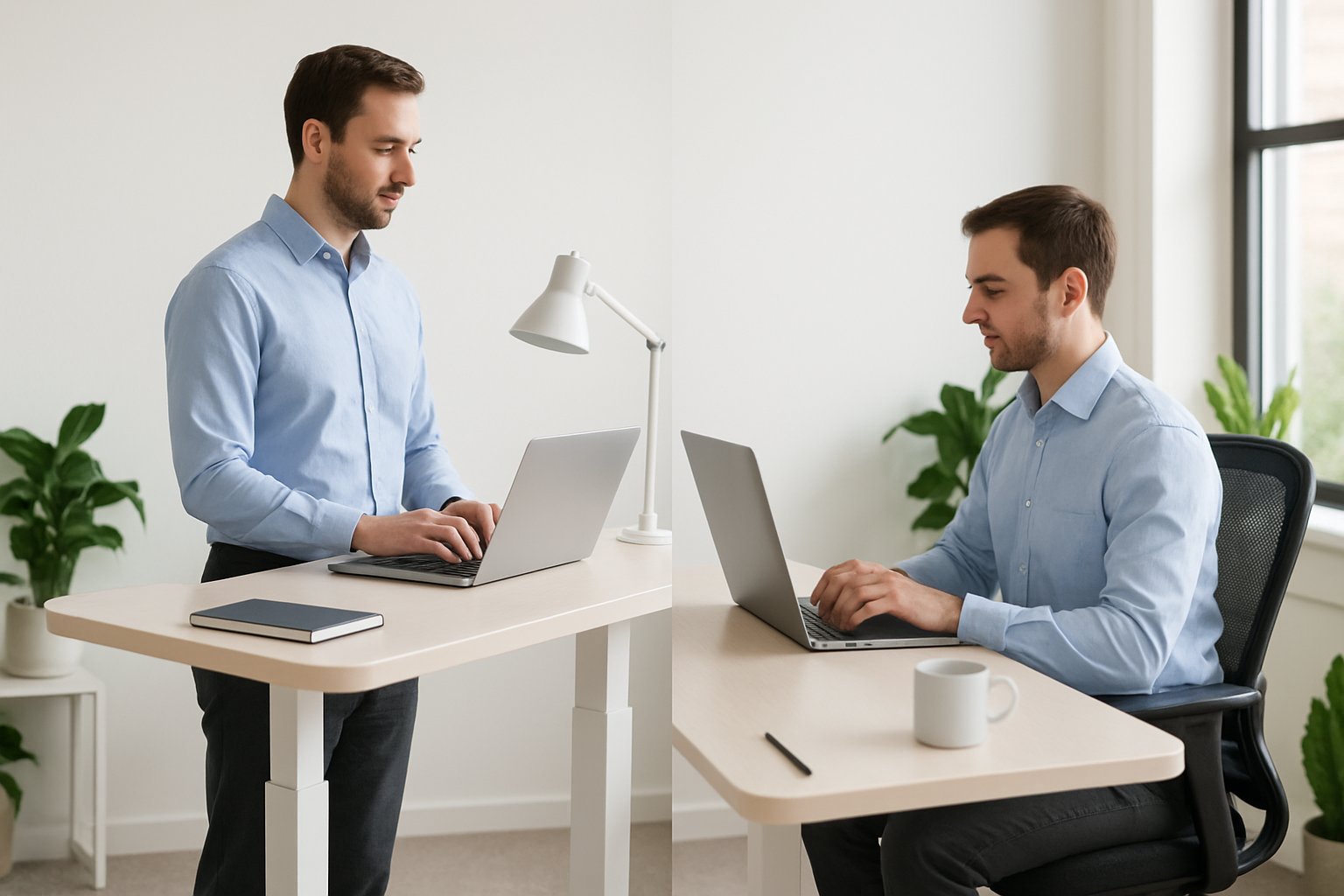
The benefits extend beyond simple comfort. Research shows that alternating positions every 30 to 60 minutes can reduce back pain by up to 54 percent while boosting energy levels and mental clarity. Poor ergonomic setups, however, create their own problems—standing too long without movement or setting incorrect desk heights leads to joint stress, neck tension, and wrist strain that undermines productivity.
The difference between an effective workspace and one that causes chronic pain often comes down to precise adjustments and consistent habits. Understanding how to set proper monitor height, when to transition between positions, and which accessories support natural body alignment transforms a standing desk from a trendy purchase into a tool that genuinely improves daily work life.
Key Takeaways
- Adjustable standing desks reduce back pain and improve circulation when users alternate between sitting and standing every 30 to 60 minutes
- Proper ergonomic setup requires elbows at 90 degrees and monitor top positioned at eye level to prevent neck and shoulder strain
- Adding anti-fatigue mats, monitor arms, and regular movement breaks maximizes comfort and maintains productivity throughout the workday
Why Invest in Adjustable Standing Desks Right Away

Adjustable standing desks deliver measurable health improvements and productivity gains within weeks of implementation. Waiting to upgrade means prolonging existing discomfort and missing opportunities to prevent chronic musculoskeletal problems.
Immediate Benefits of Adjustable Standing Desks
Height-adjustable desks allow workers to switch positions throughout the day, which improves blood circulation and reduces spinal compression. Research shows that alternating between sitting and standing every 30 to 60 minutes decreases back pain by up to 54 percent within the first month.
Energy levels increase when workers stand periodically. Studies indicate a 45 percent boost in focus and energy among employees using standing desks compared to those at traditional desks.
The ability to adjust desk height ensures proper ergonomic alignment. When the desk surface sits at elbow height with arms bent at 90 degrees, wrist strain decreases significantly. Monitor placement at eye level prevents neck tension and headaches that develop from looking down at screens.
Key immediate advantages include:
- Reduced lower back discomfort within days of use
- Enhanced circulation preventing leg swelling and fatigue
- Improved posture through customizable positioning
- Higher calorie expenditure and muscle engagement
- Better mood and cognitive performance during work hours
Risks of Delaying an Ergonomic Upgrade
Postponing the switch to adjustable standing desks allows existing problems to worsen. Sitting for extended periods compresses spinal discs, tightens hip flexors, and weakens core muscles. These conditions compound over time, leading to chronic pain that requires medical intervention.
Poor ergonomics cost businesses through decreased work efficiency and increased absenteeism. Workers experiencing back pain take more sick days and produce lower quality output. The longer employees work in non-ergonomic setups, the harder it becomes to reverse accumulated damage.
Neck and shoulder issues develop gradually from improper monitor height and desk positioning. What starts as occasional stiffness transforms into persistent tension requiring physical therapy. Wrist problems from incorrect keyboard placement can escalate to repetitive strain injuries that limit typing ability.
Delayed investment in proper equipment means missing productivity gains that accumulate daily. Every week without an ergonomic setup represents lost focus, reduced output, and preventable discomfort affecting both professional performance and personal wellbeing.
Scientific Evidence Supporting Standing Desks
Clinical studies confirm that height-adjustable desks provide measurable health benefits. The CDC reports significant reductions in upper back and neck pain among workers who alternate between sitting and standing positions regularly.
Standing burns approximately 88 calories per hour compared to 80 while seated. While the difference seems modest, the metabolic activity and micro-movements involved in standing maintain muscle engagement and prevent the sluggishness associated with prolonged sitting.
Research on workplace ergonomics demonstrates that proper desk setup reduces musculoskeletal complaints across all age groups. Workers using adjustable standing desks report fewer instances of chronic pain and higher job satisfaction scores.
Blood flow improvements from standing have been documented through circulation studies. Standing desks help prevent the fluid pooling and reduced oxygen delivery that occur during extended sitting sessions. These physiological changes translate to sustained mental clarity and reduced afternoon fatigue that typically affects desk workers.
The Fundamentals of Office Ergonomics
Proper office ergonomics centers on maintaining neutral posture throughout the workday and adjusting your workspace to fit your body’s natural alignment. These fundamentals require understanding how equipment positioning affects physical health and implementing regular movement patterns to prevent musculoskeletal disorders.
Key Ergonomic Principles
Neutral posture forms the foundation of effective ergonomics. This position keeps the spine in its natural S-curve, with feet flat on the floor and elbows bent at 90 degrees when typing. The desk height should align with the elbows to prevent wrist strain and shoulder tension.
Monitor placement requires specific attention to distance and height. The screen should sit 20-28 inches from the face, with the top third positioned at eye level when the head remains at a 90-degree angle from the neck. This prevents forward hunching and reduces neck strain during extended work sessions.
Keyboard and mouse positioning completes the ergonomic setup. Both devices need placement that maintains elbow angles at 90 degrees or slightly greater. Workers should avoid reaching forward or upward for these tools, as improper positioning accelerates wear on the wrists and hands. The shoulders remain relaxed rather than elevated when equipment sits at the correct height.
Importance of Alternating Between Sitting and Standing
The body’s metabolism drops by up to 90% after 30 minutes of continuous sitting, while lower body muscles begin shutting down from inactivity. Standing for extended periods without breaks creates similar problems, placing excessive stress on joints and the circulatory system.
Alternating positions every 15-30 minutes provides optimal benefits. Some recommendations suggest standing for one hour after every one to two hours of sitting, though workers new to standing desks should transition gradually. The adjustment period allows muscles and joints to adapt without added strain.
Movement remains critical regardless of position:
- Shifting weight between feet while standing
- Taking brief walking breaks around the office
- Stretching at regular intervals
- Using a slight knee bend to engage leg muscles
Static standing offers no advantage over prolonged sitting. Active movement throughout the day drives the health benefits associated with ergonomic workstations.
Personalizing Your Ergonomic Setup
Body dimensions vary significantly between individuals, requiring customized adjustments for proper ergonomics. Tall workers need different desk heights than shorter colleagues, and footwear changes demand corresponding workspace modifications. Someone switching from flat shoes to heeled footwear must readjust their standing desk accordingly.
Anti-fatigue mats reduce strain during standing periods. Balance boards add movement opportunities for workers who remain stationary while concentrating on tasks. Foot elevation platforms placed beneath the desk allow alternating one foot at a time, reducing lower back pressure from static standing.
Ergonomic accessories address specific physical needs. Standing desk stools with adjustable heights facilitate position changes without excess body strain. Workers requiring back support benefit from stools with contoured backing, while those needing elbow support should consider chairs with adjustable or removable armrests. Comfortable footwear becomes essential during standing work, as high heels and dress shoes compromise stability and increase fatigue risk.
Setting Up Your Adjustable Standing Desk for Optimal Comfort
Proper setup of height-adjustable desks requires precise attention to three critical measurements: desk surface position relative to elbows, screen placement at eye level, and peripheral device positioning that maintains neutral wrist alignment.
Determining Proper Desk Height
The proper standing desk height depends on elbow position rather than general height recommendations. When standing, arms should hang naturally at the sides with elbows bent at 90 degrees. The desk surface should align exactly with the forearms when they’re parallel to the floor.
This positioning prevents shoulder elevation and wrist extension, both primary contributors to upper body strain. For seated work, the same 90-degree elbow rule applies. Users should program height-adjustable desks with memory presets for both positions to eliminate daily guesswork.
Most adults require a desk height between 38-46 inches for standing and 23-30 inches for sitting, though individual measurements trump general ranges. Testing the setup involves placing hands on the keyboard—if shoulders lift or wrists bend upward, adjustment is necessary.
Monitor Placement and Eye Level
Monitor height directly affects neck posture and determines whether users maintain a neutral spine position. The top third of the screen should sit at or slightly below eye level when looking straight ahead. This prevents forward head posture, which adds up to 60 pounds of pressure on cervical vertebrae.
A monitor arm provides essential flexibility for adjusting screen height between sitting and standing positions without manual repositioning. For users without monitor arms, a monitor riser can elevate displays to proper height during seated work, though standing transitions become more cumbersome.
Monitor placement should maintain an arm’s length distance (approximately 20-26 inches) from the user’s face. Positioning monitors perpendicular to windows reduces glare that forces users to lean forward or squint.
Keyboard and Mouse Positioning
The keyboard should rest directly in front of the user at the predetermined desk height, allowing wrists to remain straight and level with forearms. An adjustable keyboard tray mounted below the desk surface can achieve proper positioning when the desk height accommodates monitor placement but sits too high for neutral wrist posture.
Mouse position matters equally—users should place it immediately beside the keyboard at the same height to prevent reaching or shoulder rotation. An ergonomic keyboard and mouse with neutral wrist angles reduce repetitive strain during extended typing sessions.
Wrist rest accessories provide support during typing pauses but shouldn’t elevate wrists above the keyboard plane during active use. Cable management systems prevent cords from pulling keyboards or mice out of position throughout the workday.
Correct Standing Desk Posture and Techniques
Proper posture at a standing desk requires maintaining the spine’s natural S-curve while keeping elbows at 90 degrees and the monitor at eye level. Common mistakes include locked knees, hunched shoulders, and static positioning that can worsen discomfort rather than alleviate it.
Maintaining Neutral Posture While Standing
The foundation of proper posture while standing begins with feet positioned shoulder-width apart and knees slightly bent. Locking the knees forces the lower back to bear the body’s weight, which increases strain and can lead to back pain over time.
The spine should maintain its natural S-curve, which is achieved by engaging the core muscles and avoiding a rigid, military-style stance. Workers should keep their weight distributed evenly across both feet rather than shifting to one side.
Key positioning elements include:
- Elbows bent at 90 degrees or slightly greater
- Wrists straight and level with the keyboard
- Shoulders relaxed and pulled back slightly
- Head balanced directly over the spine
- Monitor positioned 20-28 inches from the face
The screen’s top third should align with eye level when the chin forms a 90-degree angle with the neck. This prevents forward head posture that causes neck strain and upper back tension. Users should avoid leaning toward the screen or reaching forward with their arms.
Posture Adjustments When Sitting
Transitioning between standing and sitting requires deliberate adjustments to maintain proper posture in both positions. The desk height must change to accommodate seated elbow positioning, keeping arms at the same 90-degree angle as when standing.
An ergonomic chair or drafting stool with adjustable height ensures the feet rest flat on the floor or a footrest. The back should contact the chair’s lumbar support to maintain the spine’s natural curve.
Workers should sit with their hips slightly higher than their knees and avoid crossing their legs, which creates pelvic imbalance. The monitor remains at eye level, though the viewing distance may need slight adjustment based on the chair’s position.
Alternating positions every 15-30 minutes prevents the metabolism from slowing and keeps muscles engaged. This regular movement helps reduce back pain more effectively than maintaining either position for extended periods.
Posture Checks and Common Mistakes
Regular posture assessments throughout the workday prevent the gradual drift into harmful positions. Workers should check that their ears align with their shoulders when viewed from the side, indicating proper neck positioning.
Common posture mistakes that undermine standing desk benefits:
| Mistake | Consequence | Correction |
|---|---|---|
| Leaning on the desk | Shoulder and wrist strain | Stand upright with light fingertip contact only |
| Looking down at monitor | Neck strain and headaches | Raise monitor to eye level |
| Standing perfectly still | Joint stiffness and fatigue | Shift weight between feet regularly |
| Wearing unsupportive footwear | Foot and leg pain | Use comfortable shoes or anti-fatigue mats |
Hip positioning often reveals postural problems. One hip higher than the other or hips thrust forward indicates improper weight distribution that strains the lower back.
The wrists serve as another checkpoint. They should remain straight rather than bent upward or downward, which compresses nerves and causes discomfort. Adjusting keyboard height or angle can alleviate back pain that originates from compensatory movements elsewhere in the body.
Alternating Positions and Incorporating Movement
Switching between sitting and standing throughout the workday prevents fatigue while maintaining blood flow and muscle engagement. Regular position changes combined with deliberate movement protect against the physical strain that comes from holding any single posture too long.
Recommended Sitting and Standing Schedules
The most effective approach involves alternating every 30 to 60 minutes between sitting and standing positions. Research shows this frequency reduces back pain by up to 54 percent while maintaining energy levels throughout the day.
Workers should start with a 20-minute standing interval for every hour of sitting. This ratio allows the body to adapt without causing excessive fatigue in the legs or feet. As comfort increases over several weeks, standing duration can extend to 30 or 40 minutes per hour.
Setting reminders or using desk timers helps maintain consistency with position changes. The body naturally signals when it needs a shift through subtle discomfort or restlessness. Listening to these cues ensures the alternating schedule supports rather than strains physical wellbeing.
Benefits of Micro-Movements and Regular Breaks
Micro-movements keep muscles active and improve circulation even while maintaining a primary position. Shifting weight from one foot to another, adjusting posture slightly, or flexing ankles engages different muscle groups without interrupting workflow.
These small actions prevent blood from pooling in the lower extremities. Standing workers who incorporate weight shifts and gentle stretches report less leg fatigue and better focus compared to those who remain static.
Movement breaks should occur every 30 minutes regardless of whether someone sits or stands. A brief walk to refill water, a few shoulder rolls, or stretching the wrists takes less than two minutes but significantly boosts energy levels. Blood flow increases, oxygen delivery improves, and mental clarity returns.
Simple micro-movements to incorporate:
- Weight shifting between feet while standing
- Ankle flexes and rotations
- Shoulder shrugs and rolls
- Wrist extensions during typing pauses
- Gentle torso twists
Transitioning Gradually Between Positions
Abrupt changes to standing desk use often cause soreness and discourage continued adoption. New users should begin with 15 to 20 minutes of standing per hour, gradually building tolerance over two to three weeks.
Discomfort during the transition period is normal as muscles adapt to new demands. Mild soreness in the legs, feet, or lower back typically resolves within days. Sharp pain signals a setup problem that requires immediate adjustment to desk height, monitor position, or footwear.
Anti-fatigue mats reduce joint stress during the adaptation phase. Supportive footwear with cushioning helps prevent foot fatigue. Workers should lower the desk and sit whenever significant discomfort appears rather than pushing through pain that could lead to injury.
Essential Accessories to Enhance Comfort and Productivity
The right accessories transform a basic standing desk into a fully optimized ergonomic workspace. Proper footwear and supportive mats reduce fatigue, while converters and balance boards add versatility to existing setups.
Choosing the Right Footwear and Anti-Fatigue Mats
Anti-fatigue mats provide essential cushioning that reduces pressure on feet, legs, and lower back during extended standing periods. These mats encourage subtle movements that improve circulation and prevent the stiffness associated with static standing positions.
A quality standing desk mat should be ¾ to 1 inch thick and made from materials like polyurethane foam or gel. Mats with contoured surfaces or textured features promote foot movement and engagement of leg muscles throughout the workday.
Footwear selection matters equally for standing desk users. Shoes with proper arch support and cushioned soles reduce strain on feet and joints. Workers should avoid flat shoes without support or high heels that compromise natural posture alignment.
Standing desk mats work best on hard flooring surfaces where they provide maximum shock absorption. Users should position the mat directly in their primary standing zone and ensure it lies flat to prevent tripping hazards.
Standing Desk Converters and Balance Boards
A standing desk converter transforms any traditional desk into an adjustable height workstation without replacing existing furniture. These converters sit on top of current desks and raise monitors, keyboards, and other equipment to proper standing heights.
Converters typically feature two-tier designs with separate platforms for monitors and keyboards. Quality models offer smooth height adjustment mechanisms and stable platforms that support 35 pounds or more of equipment weight.
Balance boards introduce dynamic movement into standing desk routines by engaging core muscles and improving posture. These accessories reduce monotony and fatigue associated with static standing positions.
Users should start with 5-10 minute intervals on balance boards before gradually increasing duration. The subtle movements required for balance promote better circulation and prevent the leg fatigue that occurs from standing in one position.
Additional Ergonomic Tools and Office Setup Enhancements
A laptop stand raises screens to proper eye level, preventing neck strain for those working without external monitors. Adjustable stands accommodate both sitting and standing positions while improving airflow around devices.
Ergonomic chairs or perching stools provide rest options without forcing users into fully seated positions. These stools maintain hip angles between 120-135 degrees, supporting intermittent breaks while keeping the body engaged.
Cable management systems prevent tangled wires when adjusting desk heights between sitting and standing positions. Under-desk trays or cable sleeves keep workspaces organized and reduce trip hazards.
Monitor arms offer precise positioning control and free up valuable desk space. These accessories enable quick screen adjustments and support proper viewing distances of 20-40 inches from the eyes.
An ergonomic keyboard tray positions input devices at optimal heights that maintain neutral wrist positions. Adjustable trays accommodate individual arm lengths and prevent the shoulder elevation that causes upper body tension.